5 Step Phone Cleanup Before Selling with NIST 800-88 Proof
September 23, 2026
Yes, and skipping it can void your sale or leak your data. On modern iPhones and Android 10+ devices, one proper factory reset destroys the encryption keys protecting your data, so a reset alone is enough as long as you back up first, sign out of accounts, and turn off Find My or Find My Device. Remove your SIM and SD card before shipping. Older, unencrypted Android phones need one extra step: turn on encryption before you reset, or leftover data can still be recovered.
TL;DR:
- Modern encrypted phones rely on destroying encryption keys during factory reset, making data unrecoverable if the process is correctly followed.
- Sign out of all accounts and disable activation lock or FRP before resetting to prevent lockouts or residual account activation prompts.
- Remove SIM, microSD, and eSIM profiles separately, as reset only erases internal storage, leaving removable data intact.
- On older Android devices, enable encryption before resetting to ensure complete data destruction; newer devices with Android 10+ encrypt automatically.
- Using manufacturer-provided reset options guarantees a cryptographic wipe aligned with industry standards, especially for devices with hardware-backed security features.
Table of Contents
- How to Clean Your Phone Before Selling: The Quick Checklist
- What to Back Up Before You Wipe Anything
- How to Wipe an iPhone Before Selling It
- How to Factory Reset Android Before Selling It
- Does a Factory Reset Remove SIM and SD Card Data Too?
- How Do I Know My Phone Is Actually Wiped?
- Why a Factory Reset Actually Works: Encryption and NIST Standards
- What If the Phone Is Broken, Rooted, or Won’t Turn On?
- A Seller’s Reality Check on Cleaning a Phone
- Skip the DIY Wipe and Get Paid the Same Day
- Sources
- FAQ
How to Clean Your Phone Before Selling: The Quick Checklist
Work through these five steps in order. Skip one, and you risk shipping a phone that’s still locked to your account, or worse, still holding your photos and texts.
- Back up everything first. Contacts, photos, messages, and app data should land in iCloud, Google, or a local backup before you touch any settings.
- Sign out of every account. Removing your Apple ID or Google account first prevents Activation Lock and Factory Reset Protection (FRP) from locking the next owner out.
- Pull the SIM, microSD, and eSIM. None of these get touched by a factory reset, so handle them separately.
- Run the official factory reset. Use “Erase All Content and Settings” on iPhone or “Erase all data” on Android, never a third-party shortcut.
- Verify the wipe. Power the phone back on and confirm it lands on a plain setup screen with no account prompts.
The FTC’s guidance on removing personal information frames this as a multi-step process precisely because a reset by itself won’t touch cloud-linked accounts or removable storage.
What to Back Up Before You Wipe Anything
Losing your photo library or two years of text threads because you reset too fast is a common, avoidable mistake. Before you sign out of anything, back up contacts, photos, messages, and any authenticator app seeds you’ll need to re-enroll on a new device. Two-factor authentication apps like Google Authenticator or Authy don’t always sync automatically, so check this one manually.
Test the backup before you trust it. Restore a single photo or contact to confirm the backup actually completed, rather than discovering a failed sync after the phone is already erased.
- Cloud backups (iCloud, Google) are easiest and sync automatically, but take time on a slow connection.
- Local backups to a computer are faster for large photo libraries and don’t depend on Wi-Fi speed.
- Transferring to a new phone first using Quick Start (iPhone) or Google’s restore flow means you never have to think about the old phone’s data again.
How to Wipe an iPhone Before Selling It
Apple’s own erase process, detailed in its support guidance on preparing an iPhone for sale, is the safest path and the only one that reliably clears Activation Lock.
- Go to Settings → [your name] and sign out of your Apple ID, which also disables Find My.
- Remove any cards from Apple Pay and unpair your Apple Watch if one is linked.
- Go to Settings → General → Transfer or Reset iPhone → Erase All Content and Settings.
- If prompted, choose to erase or transfer your eSIM. Don’t assume it disappears automatically.
- Let the phone reboot, then confirm it lands on the plain “Hello” setup screen with no account lock.
If you’re switching to Android, deregister iMessage first at Apple’s iMessage deregistration page, or your new number may never receive texts from iPhone contacts.
Pro Tip: Do the Apple ID sign-out and Find My disable before you erase, not after. Erasing while still signed in is the single most common reason secondhand iPhones show up locked with someone else’s Activation Lock.
For the full walkthrough with screenshots, see BuyBackBear’s iPhone wipe guide.
How to Factory Reset Android Before Selling It
Android’s process looks similar on paper but hides one critical fork in the road for older devices.
- Remove your Google account under Settings → Accounts, along with any Samsung, Xiaomi, or other vendor account tied to the phone.
- Navigate to Settings → System → Reset options → Erase all data (factory reset). The exact path shifts slightly by manufacturer skin.
- If the phone runs Android 5.x or earlier and isn’t encrypted by default, turn on encryption first under Settings, let it finish, then reset. Skipping this step means fragments of your data can survive on unencrypted flash storage even after the reset.
- Confirm the phone reboots to the Android setup wizard with no Google account or FRP prompt.
Samsung phones specifically require removing your Samsung account in addition to your Google account, or FRP can still trigger. Pixel phones lean on Titan security chips for hardware-backed encryption, so a reset on a Pixel running a current Android version is effectively instant and complete.
Pro Tip: Check your Android version before you reset. Anything from Android 10 onward encrypts by default and resets cleanly; anything older needs that manual encrypt-first pass.
Full model-by-model notes live in BuyBackBear’s Android factory reset guide.
Does a Factory Reset Remove SIM and SD Card Data Too?
No. A factory reset only touches the phone’s internal storage. SIM cards, microSD cards, and eSIM profiles all need separate handling.
- MicroSD cards are frequently left unencrypted and are not touched by a factory reset at all. Pull it out, or wipe it separately on a computer before reinserting it for the buyer.
- SIM cards can hold small amounts of contact and message data. Remove it before you ship the phone.
- eSIM profiles can survive a reset if you don’t explicitly delete them. Delete the profile in Settings, or coordinate the transfer with your carrier.
How Do I Know My Phone Is Actually Wiped?
Power the phone on after the reset. If it lands on the language and setup screen with no Apple ID or Google account prompt, the wipe worked. If it demands your old Apple ID or Google credentials, Activation Lock or FRP is still active.
Fix that by signing back into your account online and removing the device from your device list before trying again. If the reset fails a second time, or the phone won’t boot at all, don’t hand it over. Repeated failures on a device that was previously rooted or jailbroken usually mean the firmware itself needs reflashing before a standard reset will hold.
Why a Factory Reset Actually Works: Encryption and NIST Standards
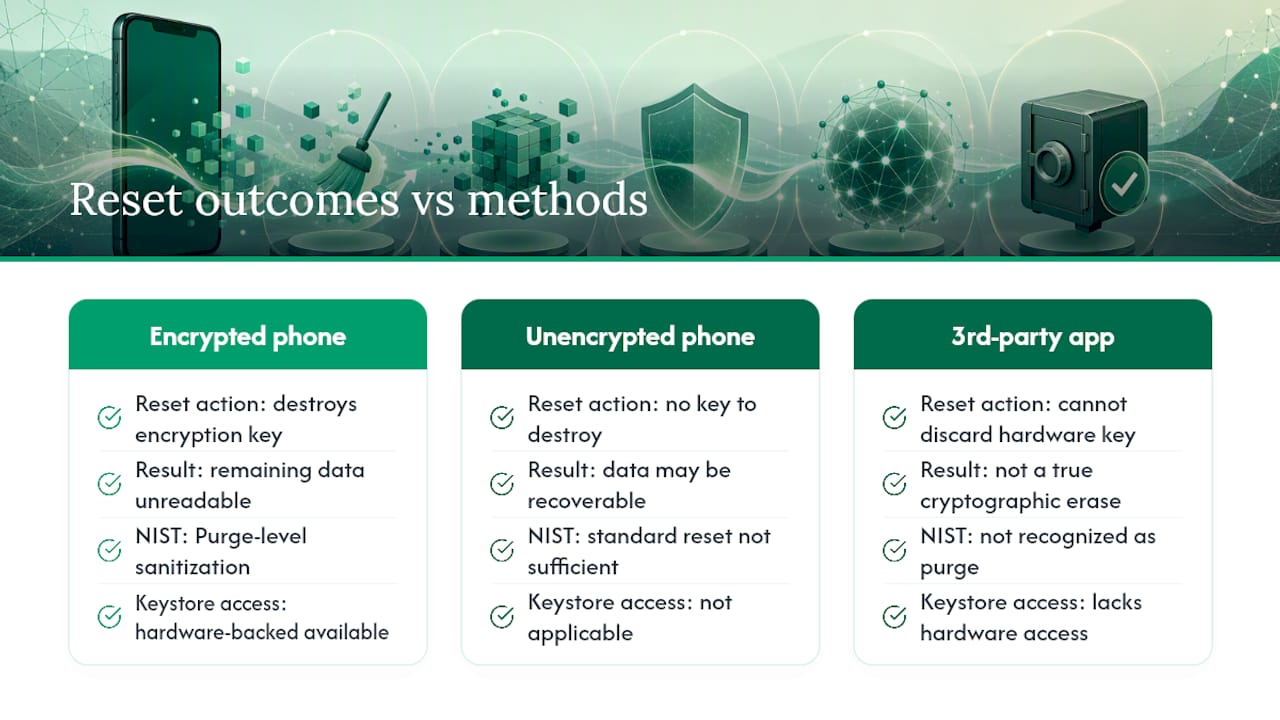
A factory reset doesn’t “erase” data in the way most people picture. It destroys the encryption key that scrambles your data, leaving what remains mathematically unreadable. This is why modern encrypted phones are safe to wipe with a standard reset, while unencrypted ones aren’t.
The NIST SP 800-88 Revision 2 media sanitization standard classifies this cryptographic erase approach as a “Purge” method, the tier appropriate for flash storage like the chips inside every modern smartphone.
Cryptographic erase, where the reset action discards the encryption key rather than physically overwriting every data cell, is recognized under NIST SP 800-88 Rev. 2 as a legitimate purge-level sanitization method for flash-based media.
Third-party “eraser” apps generally can’t perform a true cryptographic erase because they lack access to the phone’s hardware-backed keystore. Stick with the manufacturer’s built-in erase function. It’s free, and it’s the only method proven to trigger hardware-level key disposal.
What If the Phone Is Broken, Rooted, or Won’t Turn On?
Not every phone cooperates. A cracked screen or a dead battery doesn’t mean your data is safe. If the phone won’t boot, a professional data-destruction service can extract and destroy the storage directly.
- If the device won’t power on, a certified ITAD provider can physically remove and destroy the storage chip.
- A previously rooted phone needs its factory firmware ref lashed and the bootloader relocked before resale. Disclose this status to any buyer regardless.
- If resale isn’t possible, ask for a NIST-aligned certificate of erasure before the device goes anywhere, then recycle it responsibly.
A Seller’s Reality Check on Cleaning a Phone
Back up, test the restore, sign out of every account, pull the SIM and SD card, reset, then verify the setup screen. That’s the whole job. Most sellers who get burned forget one small thing: a card still in Apple Wallet, a 2FA app still pointed at the old phone, or an SD card shipped inside the box by accident. Budget 20 to 40 minutes and do it in order.
, Andy
Skip the DIY Wipe and Get Paid the Same Day
If backing up, resetting, and verifying every setting sounds like more hassle than you want, Buybackbear does the certified part for you. Every device Buybackbear buys gets wiped to the NIST 800-88 standard with a free certificate of erasure emailed to you, so you get proof the data is gone without touching a single settings menu yourself.

DIY works fine for a phone in good shape and a buyer you trust. But if your device is cracked, dead, or you just want the data destruction handled by someone who does it daily, that’s exactly when a buyback service earns its keep. Get an instant quote on your device, ship it free with a prepaid label, and get paid the same day it’s inspected. No account sign-outs, no reset menus, no wondering if you missed a step.
Sources
- NIST SP 800-88 Revision 2. Guidelines for Media Sanitization
- Android Issue Tracker, encryption/reset guidance
- FTC. How to remove your personal information before you get rid of your phone
- Apple Support. What to do before you sell, give away, or trade in your iPhone or iPad
FAQ
Does a Factory Reset Remove All Data Permanently?
On a modern, encrypted iPhone or Android 10+ phone, yes: the reset destroys the encryption key, making the underlying data unreadable. On older, unencrypted Android phones, remnants can persist unless you enable encryption before resetting.
How Do I Make Sure My iPhone Is Erased Before Selling?
Sign out of your Apple ID and disable Find My first, then go to Settings → General → Transfer or Reset → Erase All Content and Settings. Confirm the phone reboots to the plain setup screen, as detailed in Apple’s own trade-in guidance.
Is a Factory Reset Enough Before Selling a Phone?
For most modern phones, yes, once you’ve backed up your data, signed out of accounts, and removed the SIM and SD card. The FTC recommends this full sequence rather than relying on the reset alone.
Does a Factory Reset Wipe Everything on a Samsung Phone?
It wipes internal storage but leaves your microSD card and SIM untouched, and it won’t fully clear Factory Reset Protection unless you remove your Samsung account first, not just your Google account. Do that under Settings → Accounts before you reset.
Should I Use a Third-Party App to Wipe My Phone?
No. Third-party erasers typically can’t access the hardware keystore needed for a true cryptographic erase, so the built-in “Erase All Content and Settings” or “Erase all data” option is the more reliable choice. If you want a documented, certified wipe instead, Buybackbear’s data destruction service provides one with every device it buys.
Recommended
Ready to sell?
Get an instant quote, free prepaid shipping, and fast cash that beats carrier trade-in credit.
Selling your device here, at a glance
Get my instant quote →- Instant quote in about 30 seconds, price locked while you decide
- Cash by PayPal, Zelle, Venmo or check after inspection, no fees
- Free prepaid label both ways, free return shipping if you decline
- We beat any competitor's written quote by $2
- Cracked screen, broken or won't power on? Still worth real money
- Certified NIST 800-88 data wipe with an emailed certificate
- Trade-in value paid in cash, not a 24-36 month carrier bill credit
- Every model priced: unlocked or carrier-locked, any storage size