Factory Reset vs Data Wipe: What Actually Erases Your Data
August 18, 2026
A factory reset and a secure data wipe are not the same thing, and treating them as interchangeable is how people accidentally sell a phone with their bank app credentials still recoverable on it. A factory reset typically performs what NIST SP 800-88 calls a “Clear,” removing pointers, accounts, and keys through the operating system. It doesn’t guarantee the underlying data is gone.
For most everyday situations, that’s fine:
- Selling a phone to a friend or trading it in casually? A factory reset with encryption enabled is usually adequate.
- Handling financial records, health data, or anything with legal exposure? You need a certified wipe or physical destruction with documented proof.
- Not sure which bucket you’re in? Ask for a Certificate of Data Erasure or explicit NIST SP 800-88 “Purge” or “Destroy” level sanitization before you hand the device off.
Key Takeaways
A factory reset meets NIST’s “Clear” sanitization standard in most cases, while a certified data wipe is built to reach “Purge” or “Destroy,” and the gap between them is where recoverable data hides.
| Point | Details |
|---|---|
| Reset and wipe aren’t synonyms | Factory reset is usually a Clear-level action; secure wipes target Purge or Destroy. |
| SSDs need special commands | Wear-leveling can hide data from overwrites; use ATA Secure Erase or cryptographic erase instead. |
| Certificates prove sanitization | An erasure certificate documents the method, device serial, and verification result for audits. |
| Match method to sensitivity | Casual transfers suit factory reset; regulated or financial data needs certified erasure. |
| Buybackbear provides documented proof | Every device gets a NIST 800-88 compliant wipe and a free Certificate of Data Erasure before payout. |
Table of Contents
- Factory Reset vs Data Wipe: The Real Technical Difference
- What a Factory Reset Actually Removes and What It Leaves Behind
- How Do Secure Data-Wipe Methods Actually Work?
- How Does Device Type Change What You Should Do?
- Proving the Data Is Actually Gone
- When Is a Factory Reset Enough, and When Should You Escalate?
- Your Pre-Sale, Pre-Donation Checklist
- How Do Professionals Erase Data at Scale?
- Convenience Is Not the Enemy, but Proof Matters
- Get Paid and Get Proof Your Data Is Actually Gone
- Sources
- FAQ
Factory Reset vs Data Wipe: The Real Technical Difference
A factory reset is a logical operation. It runs through the operating system, deletes file pointers, wipes accounts, and restores settings to their out-of-box state. On most modern phones, it also triggers key deletion, discarding the encryption key that unlocked your data so the data itself becomes unreadable even if it’s technically still sitting on the chip.
A data wipe, sometimes called secure erase, is a different animal. It’s a deliberate sanitization process that overwrites storage, invokes device-specific commands, or destroys cryptographic keys with verification built in. The goal isn’t just to make data inconvenient to find. It’s to make it recoverable by nobody, including a forensics lab with a clean room and a budget.
NIST SP 800-88 gives the industry its common language for this, breaking sanitization into three tiers:
- Clear: Logical techniques like standard read/write commands or a factory reset, appropriate for low-sensitivity reuse.
- Purge: Device-specific commands or cryptographic erase that make recovery infeasible even with advanced lab techniques.
- Destroy: Physical destruction that renders the media completely unusable.
A factory reset is often a Clear-level action. A data wipe that meets audit or resale standards is usually built to hit Purge or Destroy. The gap between those two tiers is exactly where most data breaches involving “already reset” devices come from.
What a Factory Reset Actually Removes and What It Leaves Behind
When you tap “erase all content,” the phone or computer runs through a specific, limited sequence. It removes the file table entries pointing to your photos, messages, and app data. It deletes your signed-in accounts. It clears visible settings and app installations. On devices with hardware encryption, like most phones sold in the past decade, it also discards the encryption key, a process researchers call key wipe.
Key wipe is genuinely useful. Without the key, the encrypted blob left on the chip is mathematically gibberish. But it isn’t the same guarantee as removing the data itself, and key deletion carries its own caveats: if a backup copy of the key exists somewhere, or if the device’s hardware has a known vulnerability, the “wiped” data can, in rare cases, become readable again.
Here’s what commonly survives a standard factory reset:
- Unallocated space where old files sat before their pointers were deleted.
- Database and journal fragments from apps like messaging or email clients, which often cache data outside the main file structure.
- Spare areas from wear-leveling on flash storage, physical blocks the OS never directly overwrites.
- Backups, both local and cloud, that a reset doesn’t touch at all.
- SIM cards, eSIM profiles, and paired cloud accounts that keep data synced somewhere off-device.
Practitioner testing on corporate mobile devices has found that a reset alone can leave meaningful data recoverable on a surprising share of devices, which is exactly why regulated industries won’t accept a plain reset as proof of anything. Recovery services exist specifically because this kind of remnant data is retrievable often enough to build a business around it.
Pro Tip: Right after any factory reset, boot the device once and check that it asks for initial setup rather than showing any of your old data. If it skips straight to a home screen with old apps intact, the reset didn’t finish, and you should run it again before handing the device off.
How Do Secure Data-Wipe Methods Actually Work?
Overwriting is the oldest method and still one of the most reliable on traditional hard drives. A single-pass overwrite writes a pattern of zeros or random data across every sector, then a verification pass confirms the write succeeded. Multi-pass overwrites repeat this several times, though for modern drives a single verified pass is generally considered sufficient by NIST’s own guidance.
Solid-state drives complicate things. Wear-leveling spreads writes across physical cells to extend the drive’s lifespan, which means an OS-level overwrite command doesn’t necessarily touch every location where your data once lived. That’s why SSDs and phone flash storage often need a different tool entirely: cryptographic erase, which destroys the encryption key rather than chasing every physical cell.
Device-specific commands matter here. ATA Secure Erase and NVMe Sanitize are built into the drive’s firmware and instruct the controller to reset every accessible and hidden cell, including the spare areas overwrite software can’t reach. For media that’s failing, obsolete, or headed for a compliance-sensitive disposal, degaussing (for magnetic media) or physical shredding remains the only option that meets a Destroy standard.
| Method | Typical Guarantee | Best Use Case |
|---|---|---|
| Standard overwrite | Clear to Purge | HDDs, older drives without encryption |
| ATA Secure Erase / NVMe Sanitize | Purge | SSDs and NVMe drives with firmware support |
| Cryptographic erase | Purge (with caveats) | Encrypted phones, tablets, self-encrypting drives |
| Degauss | Purge to Destroy | Magnetic tape and older HDDs |
| Physical shredding | Destroy | Failed drives, highest-sensitivity disposal |
How Does Device Type Change What You Should Do?
The right sanitization method depends heavily on what’s inside the device, not just what brand is on the case.
Smartphones running iOS or modern Android use hardware-backed encryption tied to a secure element, Apple’s Secure Enclave or Android’s equivalent. On these, a factory reset’s key wipe is often genuinely strong, provided the OS is current and the device wasn’t jailbroken or rooted. Older phones without hardware encryption need a full software wipe, not just a reset.
SSDs and flash storage need device-specific sanitize commands or cryptographic erase rather than a blind overwrite, because wear-leveling and over-provisioning can hide entire blocks of data from a generic overwrite pass.
HDDs are the exception where multi-pass overwriting genuinely works as intended, since there’s no wear-leveling layer hiding physical sectors from the command.
Windows and Mac systems add another wrinkle. Macs with FileVault enabled and Windows machines with BitLocker active already encrypt the drive by default, meaning disabling the encryption and clearing the key can achieve a Purge-equivalent result quickly, without a lengthy overwrite.
Quick recommendations by device:
- Modern encrypted phone, personal use: factory reset is usually enough.
- Older phone or unknown encryption status: run a software wipe or get certified erasure.
- SSD/laptop for resale: use manufacturer sanitize tools or a certified erasure service, not a generic overwrite tool.
- Failed or damaged drive: skip software entirely; go straight to certified destruction.
Proving the Data Is Actually Gone
Deleting data and proving you deleted it are two separate problems, and the second one is what auditors, buyers, and compliance teams actually care about. NIST SP 800-88 exists partly to give organizations a common vocabulary so a claim of “wiped” means the same thing to everyone reading a report.
A proper erasure certificate typically documents the device’s serial number, the method used, the date, and a pass/fail verification result, often cross-referenced against the specific NIST category achieved. That paper trail is what turns “I reset it, I promise” into something a regulator or an IT auditor can actually accept.
Without documented verification, factory resets carry no native audit trail, which is precisely why compliance frameworks like HIPAA and PCI-DSS often reject a plain reset as sufficient proof of data destruction.
Consumers have limited but real options for self-verification: booting the device to confirm it lands on initial setup, running a storage health tool to confirm the drive reports as blank, or checking that cloud accounts have been fully unlinked. These checks confirm the obvious failures but can’t detect subtle remnants the way a forensic recovery attempt would.
When Is a Factory Reset Enough, and When Should You Escalate?
Match the sanitization method to what’s actually at stake, not to what’s fastest.
- Low risk (personal phone going to a family member, casual resale): factory reset with encryption enabled is typically adequate.
- Medium risk (device held personal financial or health data, sold to a stranger): factory reset plus a software wipe with a verification report is the safer bet.
- High risk (corporate device, regulated data, IP exposure): cryptographic erase or full overwrite plus a certificate of destruction, no exceptions.
Escalate a level whenever you hit one of these triggers: the device is old enough that its encryption status is unclear, it’s headed to an unknown buyer rather than someone you trust, or your organization has any compliance obligation attached to the data it held.
| Point | Details |
|---|---|
| Match method to risk | Casual transfers can use factory reset; regulated or financial data needs certified erasure. |
| Reset is Clear, not Purge | A standard factory reset meets NIST’s Clear category, not the stronger Purge or Destroy tiers. |
| SSDs need special handling | Wear-leveling can hide data from overwrites; use sanitize commands or cryptographic erase instead. |
Your Pre-Sale, Pre-Donation Checklist
- Back up everything first, both to a cloud service and a local copy, and confirm the backup actually opened before you erase anything.
- Sign out of all cloud accounts, including iCloud, Google, and any manufacturer account tied to activation locks.
- Remove physical and virtual SIMs, unpair Bluetooth accessories, and pull any external storage cards.
- Enable encryption if it isn’t already on, then run the factory reset, since encrypting first makes the key wipe meaningfully stronger.
- Run the platform’s factory reset through official settings, never a third-party shortcut app.
- If selling through a buyback service, ask directly whether they issue a Certificate of Data Erasure and what standard they sanitize to.
Pro Tip: Restore a test device from your backup before you erase the original, confirming the backup is complete, so you’re not left stuck mid-sale realizing your photos didn’t actually transfer.
Pro Tip: If your device supports full-disk encryption but it’s not on by default, turn it on and let it finish encrypting before you reset. It takes minutes and makes any subsequent key wipe dramatically more effective.
How Do Professionals Erase Data at Scale?
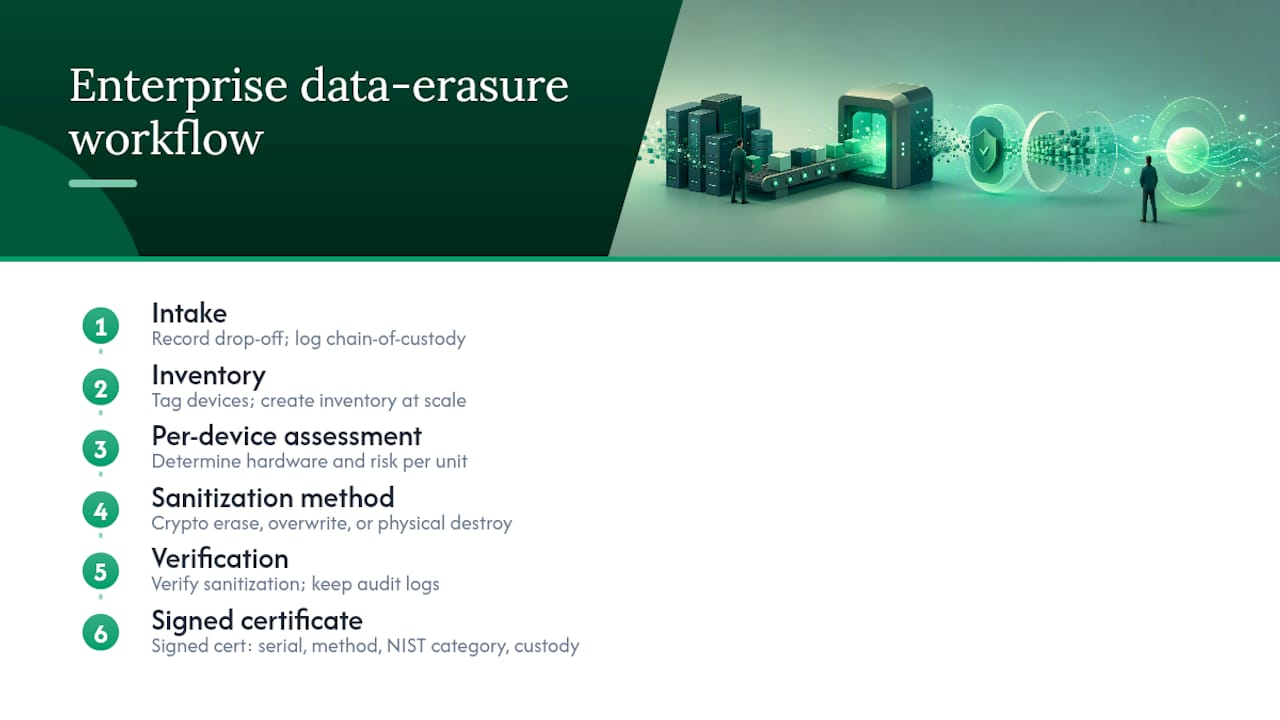
Enterprise data disposal follows a workflow most consumers never see: intake, inventory, per-device assessment, then a sanitization method chosen based on the device’s hardware, whether cryptographic erase, full overwrite, or physical destruction, followed by verification and a signed certificate. ITAD providers use this exact structure to meet NIST SP 800-88 across hundreds or thousands of devices without missing one.
What separates a serious vendor from a corner-cutting one is the paperwork. A real certificate names the exact device by serial number, states the method and NIST category achieved, and ideally includes chain-of-custody documentation showing who handled the device between drop-off and destruction.
Pro Tip: Before trusting any bulk buyback or disposal service with a fleet of devices, ask to see a sample certificate first. If they can’t produce one before you ship anything, that’s your answer.
Convenience Is Not the Enemy, but Proof Matters
Most people overthink low-stakes transfers and underthink high-stakes ones. Handing a reset iPhone to your cousin doesn’t require a forensic audit trail. Handing a stack of old work laptops to whoever offers the highest price without asking about their sanitization method is a different kind of risk entirely, one people rarely think through until something goes wrong.
The honest posture is risk-based, not maximalist. Use a factory reset for casual, personal transfers where the downside of a hypothetical recovery is low. Reach for certified sanitization the moment financial records, health data, business IP, or regulatory obligations enter the picture. Buybackbear builds its own process around NIST 800-88 compliant wipes with a Certificate of Data Erasure attached to every device specifically because “I think it’s fine” isn’t proof anybody can act on later.
Get Paid and Get Proof Your Data Is Actually Gone
Selling a device shouldn’t mean choosing between a fair price and knowing your data is truly gone. Buybackbear pays cash the same day your device is inspected, and every unit goes through a NIST 800-88 compliant wipe with a free Certificate of Data Erasure attached, so you have documented proof, not just a promise.

That certificate matters whether you’re clearing out a personal phone or retiring an entire office’s worth of laptops. Three things you get beyond the payout: audit-ready proof for anyone who asks later, a resale value that beats what most recycling programs offer, and a process that skips the back-and-forth of private buyers. Businesses managing bulk devices can use the dedicated buyback program for fleet-level pickup and documentation. If it’s a single phone, get an instant quote for your device and ship it free with a prepaid label.
Sources
- SP 800-88 Rev. 2, Guidelines for Media Sanitization | CSRC
- Guidelines for Media Sanitization (NIST SP 800-88 Rev. 2)
- Smartphone Data Destruction: Secure Disposal for Corporate Mobile Devices – Disposition Compliance | IT Asset Disposition Guide
- Factory Reset vs. Secure Deletion: Why a Key Wipe Alone Sometimes Isn’t Enough
FAQ
Is a Data Wipe the Same as a Factory Reset?
No. A factory reset is usually a logical, Clear-level operation, while a data wipe is a deliberate sanitization process designed to meet the stronger Purge or Destroy standards under NIST SP 800-88.
Is Factory Reset 100% Safe?
Not for sensitive or regulated data. It’s typically adequate for casual, low-risk transfers, but practitioner testing has found recoverable remnants on devices that only received a standard reset.
What Data Is Not Deleted After a Factory Reset?
Unallocated storage space, database and journal fragments, wear-leveling spare areas on flash drives, and anything stored in linked cloud accounts or backups often survive a factory reset untouched.
Does a Data Wipe Erase Everything?
A properly executed wipe using verified overwriting, ATA Secure Erase, or cryptographic erase is designed to make recovery infeasible, though cryptographic erase specifically depends on the encryption key being fully unrecoverable. Services like Buybackbear’s certified erasure pair the wipe with a verification report to confirm the result.
Recommended
Ready to sell?
Get an instant quote, free prepaid shipping, and fast cash that beats carrier trade-in credit.
Selling your device here, at a glance
Get my instant quote →- Instant quote in about 30 seconds, price locked while you decide
- Cash by PayPal, Zelle, Venmo or check after inspection, no fees
- Free prepaid label both ways, free return shipping if you decline
- We beat any competitor's written quote by $2
- Cracked screen, broken or won't power on? Still worth real money
- Certified NIST 800-88 data wipe with an emailed certificate
- Trade-in value paid in cash, not a 24-36 month carrier bill credit
- Every model priced: unlocked or carrier-locked, any storage size