Sell AirPods for Cash: The Fast, Safe Way
August 10, 2026
The fastest way to sell AirPods for cash is to remove them from your Apple Account, clean them up, and submit them to a buyback service that sends real money the same day it inspects the device. No waiting for a buyer to show up, no haggling, no shipping anxiety.
Here’s the short version of what you need to do right now:
- Remove your AirPods from Find My (not just Bluetooth “Forget”, that’s not enough)
- Factory reset the AirPods and charging case
- Clean the buds, mesh grilles, and case
- Gather the case, cable, ear tips, and original box if you have them
- Get an instant quote from Buybackbear and ship free with a prepaid label
If you’d rather chase the highest possible price, peer-to-peer marketplaces can get you more, but expect a week or two of listing, messaging, and risk management. For most sellers, the speed and certainty of a buyback service wins.
Pro Tip: Before you do anything else, screenshot your AirPods’ serial number from Settings > Bluetooth > your AirPods > the (i) icon. You’ll need it for listings, warranty transfers, and any shipping disputes.
Buybackbear tracks competitor quotes daily and beats any written offer by a competitive amount so you’re not leaving money on the table by skipping the marketplace grind. Every device gets a NIST 800-88 certified data wipe with a Certificate of Data Erasure included.
Key Takeaways
Selling AirPods for cash comes down to three steps: remove the device from your Apple Account via Find My, clean and document it properly, and choose the selling method that matches your priority, speed or maximum price.
| Point | Details |
|---|---|
| Find My removal is mandatory | Resetting alone won’t release your Apple Account association; use Find My to remove the device. |
| Clean before listing | Dry cloth, soft brush, and fresh silicone tips improve buyer confidence and sale speed. |
| Include all accessories | Case, cable, ear tips, and original box all raise your offer or listing price. |
| Price to sold comps | Used AirPods typically sell for 30–60% below retail; check completed sales, not asking prices. |
| Buybackbear for fast cash | Instant quote, free prepaid shipping, same-day payout, and NIST 800-88 certified data wipe. |
Table of Contents
- How to sell AirPods: remove them from your Apple Account first
- How to clean and inspect your AirPods before selling
- Where to sell used earbuds: your four main options
- How to price your AirPods and write a listing that converts
- Packaging, shipping, and what happens after you ship
- How to avoid scams and stay safe when selling locally
- Does AppleCare affect your sale?
- How Buybackbear works for selling AirPods
- Speed vs. price: a seller’s perspective
- Get a fast quote for your AirPods from Buybackbear
- Sources
- FAQ
How to sell AirPods: remove them from your Apple Account first
This step trips up more sellers than any other. Resetting your AirPods does not release them from your Apple Account. According to Apple Support, you must remove the device through Find My or iCloud before a new owner can pair them. Bluetooth “Forget This Device” leaves the association intact.
To remove via the Find My app (iPhone, iPad, or Mac):
- Open the Find My app and tap the Devices tab.
- Select your AirPods from the list.
- Scroll down and tap Remove This Device, then confirm.
- Power off or put the AirPods in the case before shipping.
To remove via iCloud.com:
- Go to iCloud.com and sign in.
- Open Find My, click All Devices, and select your AirPods.
- Click Remove This Device.
Apple’s guidance on linked accounts explains what to do if the AirPods show as connected to a different Apple Account, a situation that comes up when you’re selling a device you received as a gift or bought used. Only the account owner can remove them; Apple cannot do it for you.
Model-specific reset steps:
- AirPods (1st–4th gen) and AirPods Pro: Hold the setup button on the back of the case for about 15 seconds until the status light flashes amber, then white.
- AirPods Max: Hold the noise control button and the Digital Crown simultaneously for about 10 seconds until the LED flashes amber.
9to5Mac confirms that resetting alone doesn’t always clear the Apple ID association, which is why the Find My removal step is non-negotiable.
Pro Tip: After removing the device from Find My, check the app’s device list to confirm your AirPods no longer appear. Then attempt a fresh pairing with a different iPhone to verify the buyer will have a clean experience.
How to clean and inspect your AirPods before selling
Poor hygiene is the most common reason used AirPods sit unsold. A 15-minute cleaning session can meaningfully improve buyer confidence and sale speed.
What you’ll need: a dry lint-free cloth, a soft-bristled brush (a clean toothbrush works), mild soap, and water for silicone tips only.
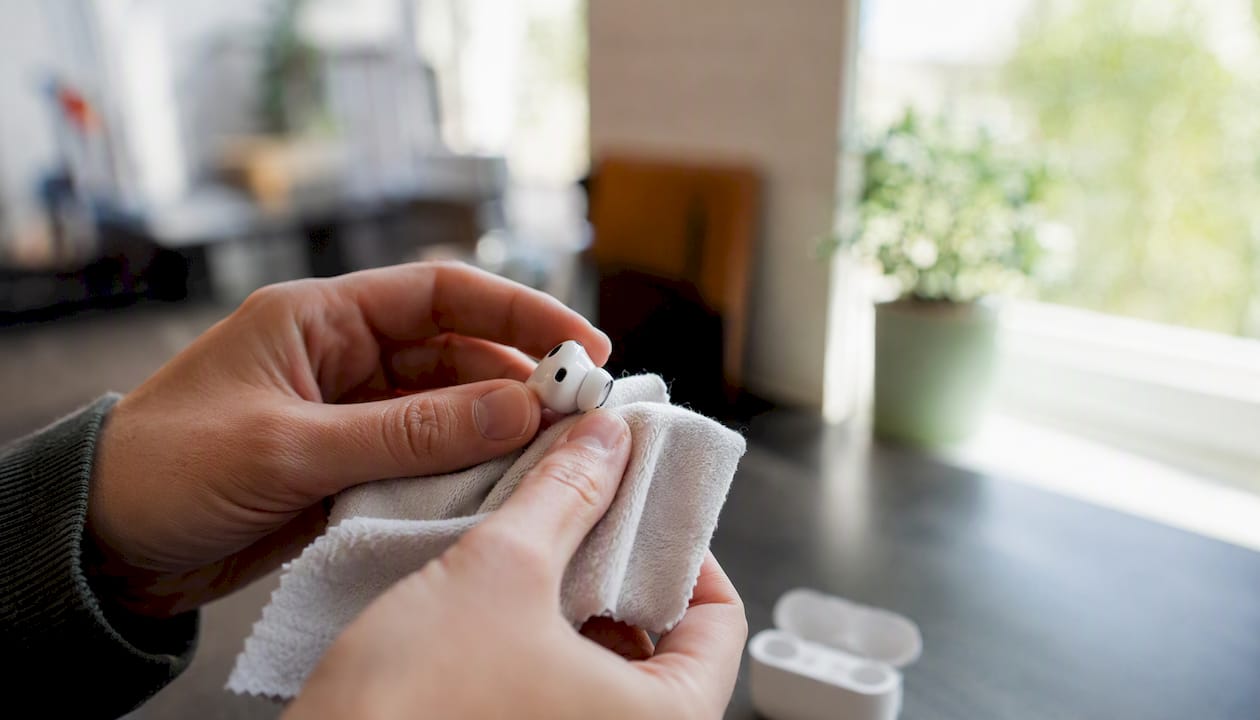
- Wipe the exterior of each bud and the case with a dry lint-free cloth.
- Use a soft-bristled brush to gently sweep debris from the speaker and microphone meshes. Work from the center outward.
- For AirPods Pro, remove the silicone ear tips, rinse them with fresh water, wash with mild soap, rinse again, and let them air dry for at least two hours before reattaching.
- Clean the charging case interior with a dry cotton swab. Avoid pushing debris into the charging contacts.
What to avoid: no liquids near meshes or charging ports, no sharp tools, no cotton swabs inserted into speaker openings. Apple’s cleaning guidance and Swappa’s model-specific cleaning guide both flag these as the most common damage points.
Gather everything that adds value:
- Charging case (a missing case drops your price significantly)
- Lightning or USB-C cable
- Spare silicone ear tips (all sizes)
- Original box and documentation
- Serial number screenshot or proof of purchase
Pro Tip: Replacing worn AirPods Pro ear tips with a fresh set costs a few dollars and can noticeably lift perceived hygiene. For stubborn mesh debris, a small piece of poster putty pressed gently against the grille lifts earwax without pushing it deeper, use light pressure and don’t drag.
Where to sell used earbuds: your four main options
Your choice comes down to one question: do you want cash fast, or are you willing to work for a higher number?
| Method | Expected payout | Time to cash | Convenience | Inspection / return window | Payment options |
|---|---|---|---|---|---|
| Buyback services | Good (market rate) | Same day as inspection | High, free prepaid label | Yes, condition re-grade possible | PayPal, Venmo, bank transfer, debit |
| Retail / carrier trade-ins | Low to moderate | Immediate in-store | High, drop off in person | Minimal | Store credit only |
| Peer-to-peer marketplaces | Highest potential | 1–2 weeks | Low, you manage everything | Buyer-initiated returns | Varies by platform |
| Local in-person buyers | Moderate | Immediate | Moderate, requires meetup | None | Cash |
Buyback services offer the best combination of speed and reliability. You get a real cash offer upfront, ship for free, and receive payment the same day the device clears inspection. The tradeoff is that the payout is slightly below what a motivated peer-to-peer buyer might pay.
Retail and carrier trade-ins are convenient but almost always pay in store credit, not cash. That credit is often spread over months or locked to a specific carrier.
Peer-to-peer marketplaces can yield the highest price, but you’re managing photos, listings, buyer questions, shipping, and the occasional return. For a a solid amount item, that’s a lot of friction.
Local buyers offer immediate cash but carry the most personal risk. More on that in the safety section below.
Pro Tip: Before listing peer-to-peer, check recently sold listings (not just asking prices) for your exact model and condition. Asking prices are wishful thinking; sold prices are what buyers actually pay.
How to price your AirPods and write a listing that converts
Price to current sold comps, not to what you paid. Swappa’s selling guide recommends checking recent completed sales for your exact model and condition rather than anchoring to retail price. Used AirPods typically sell for a substantial discount below retail, depending on generation, condition, and what’s included.
Approximate resale ranges by condition (peer-to-peer market):
| Condition | Description | Estimated range |
|---|---|---|
| Like new | Minimal use, all accessories, original box | substantial discount below retail |
| Good | Normal wear, case included, no accessories box | substantial discount below retail |
| Fair | Visible wear, missing some accessories | substantial discount below retail |
| Poor | Heavy wear or missing case | Below 30% of retail |
Photo checklist:
- Close-up of each bud’s mesh and tip
- Both buds seated in the open case
- Charging port on the case
- Serial number (visible on the case hinge or in Settings)
- All included accessories laid out flat
- Any cosmetic flaws, clearly lit
Listing language that reduces returns:
- State the exact model and generation (e.g., AirPods Pro 2nd generation, USB-C case).
- List every included item.
- Note battery health if you have it (Settings > Battery on a connected iPhone).
- Confirm: “Removed from Apple ID and factory reset.”
- Describe condition honestly, “light scratches on case lid” beats a return dispute.
- Set a target of selling within one week; if it hasn’t moved, drop 10% and reassess.
Factor platform fees and shipping into your floor price before you list. What looks like a a competitive amount sale can net a competitive offer after fees and a padded mailer.
Packaging, shipping, and what happens after you ship
Getting the device there safely protects your payout. A cracked case or loose bud that arrives damaged can trigger a condition re-grade that lowers your offer.
How to pack AirPods for shipping:
- Place AirPods in the charging case, latched closed.
- Wrap the case in bubble wrap (two layers minimum).
- Put it in a small padded mailer or rigid box with no room to shift.
- Seal with packing tape on all seams.
- Attach the shipping label flat and photograph the sealed package before dropping it off.
For peer-to-peer sales, use a tracked service like USPS Ground Advantage. Keep the receipt. Swappa’s shipping guidance recommends photographing the packed item and saving all receipts as dispute protection.
What to expect from a buyback service:
- Free prepaid label emailed after you accept the quote
- Inspection typically completed within one business day of arrival
- Payout via PayPal, Venmo, debit card, or bank transfer, often the same day inspection is confirmed
- If the device arrives in worse condition than quoted, you’ll receive a revised offer, you can accept or have the device returned
After you ship:
- Save the tracking number and confirmation email
- Monitor tracking to confirm delivery
- Check your email for inspection results
- Confirm payment receipt and keep a record
How to avoid scams and stay safe when selling locally
Online fraud targeting electronics sellers is common. Knowing the patterns makes it easy to spot.
Red flags to watch for:
- Buyer offers to pay more than your asking price and asks you to reship the difference
- Buyer insists on a payment method with no buyer protection (Zelle, wire transfer, gift cards)
- Buyer sends a fake payment screenshot and asks you to ship immediately
- Local buyer wants to meet somewhere isolated or at an unusual hour
- Buyer asks for your serial number before completing the transaction (can be used to file false warranty claims)
Never ship a device before payment clears in your account. A screenshot of a payment confirmation is not a payment. For peer-to-peer sales, use PayPal Goods & Services with tracking attached, this gives you seller protection if the buyer disputes the transaction. Venmo business transfers and bank transfers to a verified business account are also reasonable options. Cash is fine for local sales, but count it before handing over the device.
Safe local meetup checklist:
- Meet in a well-lit public place (many police stations have designated exchange zones)
- Bring a friend if possible
- Let the buyer test pairing before you accept payment
- Count cash or confirm transfer before handing over the device
- Keep your serial number and pre-sale photos in case of a dispute
Does AppleCare affect your sale?
Active AppleCare coverage is a genuine selling point. Apple Support notes that sellers can either transfer an AppleCare plan to the new owner or cancel it for a prorated refund.
Disclosure checklist:
- State whether AppleCare is active and its expiration date
- Include the serial number so the buyer can verify coverage at apple.com/support
- Note any prior repairs or service history
- Decide before listing: transfer or cancel
To transfer AppleCare:
- Locate your AppleCare agreement number (in your Apple ID purchase history or the original receipt).
- Provide the agreement number and serial number to the buyer.
- The buyer contacts Apple to complete the transfer.
To cancel AppleCare:
- Sign in to appleid.apple.com.
- Go to Subscriptions and select your AppleCare plan.
- Cancel and receive a prorated refund based on remaining coverage.
Transferable coverage can justify a higher asking price, especially for AirPods Pro models where the plan covers accidental damage.
How Buybackbear works for selling AirPods
Buybackbear is built for sellers who want cash without the marketplace hassle. The process is four steps: get an instant online quote, ship free with a prepaid label, wait for inspection, and get paid.
What you get with Buybackbear:
- Instant quote for your specific AirPods model and condition
- Free prepaid shipping label, no out-of-pocket cost
- Same-day payout via PayPal, Venmo, debit card, or bank transfer once inspection is confirmed
- NIST 800-88 certified data wipe with a Certificate of Data Erasure included
- Daily competitor price tracking with a beat-any-written-quote policy (a competitive amount over any competing offer)
- Responsible recycling for devices that can’t be resold
The NIST 800-88 standard is the federal benchmark for certified data destruction. Getting a Certificate of Data Erasure means you have documented proof your personal data was wiped, not just reset, but destroyed to a verifiable standard. That matters if you ever had iCloud data, payment methods, or personal audio settings stored on the device.
You can check model-specific pricing for AirPods 3rd gen, AirPods 4th gen, or AirPods Pro directly on Buybackbear’s site.
Pro Tip: If you have a written quote from another buyback service, Buybackbear will beat it by a competitive amount. Screenshot the competing offer before you submit your device.
Speed vs. price: a seller’s perspective
Marketplace listings can get you more money. That’s real. But the gap between a buyback offer and a peer-to-peer sale is usually a solid amount for a set of used AirPods, and that gap costs you time, effort, and risk. You’ll spend hours on photos, listing copy, buyer questions, and shipping logistics, and you might still get a return request two weeks in.
The sellers who do best on marketplaces are the ones who treat it like a part-time job: they cross-list, respond fast, and know exactly when to drop the price. If that’s not you, the buyback route isn’t a compromise. It’s the smarter call for your situation.
Pick your goal first. Cash now, or maximum price with patience. Then follow the path that matches it.
Get a fast quote for your AirPods from Buybackbear

Buybackbear pays real cash for used AirPods, not store credit, not bill credit spread over two years. Submit your model and condition for an instant quote, ship free with a prepaid label, and get paid via PayPal, Venmo, debit card, or bank transfer the same day your device clears inspection. Every device gets a NIST 800-88 certified data wipe with a Certificate of Data Erasure at no extra charge. Buybackbear tracks competitor prices daily and beats any written quote by a competitive amount.
Get your instant AirPods quote and start the process in under two minutes.
Sources
- Before you sell, give away, return, or recycle your AirPods - Apple Support
- How to Clean Apple AirPods: Every Model, Every Part – Swappa Blog
- How to reset AirPods, remove AirPods Apple ID - 9to5Mac
FAQ
Where can I sell my AirPods for cash?
Buyback services like Buybackbear pay cash directly via PayPal, Venmo, debit card, or bank transfer. Peer-to-peer marketplaces can yield more but require more time and effort.
Are used AirPods worth reselling?
Yes. Used AirPods in good condition with the charging case typically sell for a significant portion of retail prices, making them one of the more liquid used electronics categories.
What is the best place to sell AirPods quickly?
For speed and reliability, a buyback service is the best option. Buybackbear offers an instant quote, free prepaid shipping, and same-day payout once the device is inspected.
How much will I get if I sell my AirPods?
It depends on the model, condition, and what’s included. Used AirPods generally sell for a substantial discount below retail. Including the case, cable, and ear tips raises your offer; missing the case lowers it significantly.
Can you sell AirPods without the case?
Yes, but expect a lower offer. Most buyers and buyback services factor the case into their pricing, so selling without it will reduce what you receive.
Recommended
Ready to sell?
Get an instant quote, free prepaid shipping, and fast cash that beats carrier trade-in credit.
Selling your device here, at a glance
Get my instant quote →- Instant quote in about 30 seconds, price locked while you decide
- Cash by PayPal, Zelle, Venmo or check after inspection, no fees
- Free prepaid label both ways, free return shipping if you decline
- We beat any competitor's written quote by $2
- Cracked screen, broken or won't power on? Still worth real money
- Certified NIST 800-88 data wipe with an emailed certificate
- Trade-in value paid in cash, not a 24-36 month carrier bill credit
- Every model priced: unlocked or carrier-locked, any storage size