Save Your Buyback Payout: Prepaid Label Tracking for Device Sellers
September 13, 2026
Yes. Every prepaid shipping label carries a real carrier tracking number, and it updates the same way any paid label does. The moment that label is created, save the tracking number, screenshot the barcode or QR code, and forward it to whoever is dropping off or receiving the package. That single habit prevents almost every tracking headache described below.
TL;DR:
- Tracking numbers are generated immediately when a label is created, enabling proof of shipment before the package is sealed or picked up.
- The tracking barcode remains the same regardless of whether postage was prepaid online or purchased at the counter, making it universally trackable across carriers.
- Saving or screenshotting the tracking number or barcode instantly upon label creation prevents weeks of guessing in case of tracking issues or lost records.
- Using multiple methods to share prepaid labels, such as email, scan-to-print, or mailing printed copies, helps avoid delays caused by lack of printing resources.
- Regularly checking tracking updates through USPS or merchant alerts and retaining proof of shipment reduces disputes, delays, and potential payout issues.
Table of Contents
- How Prepaid Label Tracking Actually Works
- Where to Find a Prepaid Label’s Tracking Number
- How to Get a Prepaid Label to Whoever Is Shipping It
- Tracking a Prepaid Label Step by Step
- Fixing Common Prepaid Label Tracking Problems
- Prepaid Label Tracking in a Device Buyback Flow
- Why Small Tracking Habits Save Real Money
- Sell Your Device With a Tracked, Free Prepaid Label
- Official Resources for Live Rules and Tools
- Sources
- FAQ
How Prepaid Label Tracking Actually Works
“Prepaid” only describes how the postage got paid for, not how the package gets handled. Once USPS or another carrier scans that barcode, the shipment moves through the exact same tracking pipeline as a label someone bought at the counter that morning. The barcode is the permanent handle on the shipment. Everything else, including who paid and when, is just metadata attached to it.
The tracking number exists before the package ever reaches a truck or a Post Office counter. It’s generated the instant the label is created, whether that happens through Click-N-Ship, a merchant’s return portal, or a buyback company’s quote page. That timing matters more than most people realize: it means you can hand someone a tracking number to watch before the box is even sealed, and it means the sender has proof of shipment intent from the second the label prints, not just from the first scan.
From there, USPS Tracking updates as scans happen throughout the day, starting with acceptance at a Post Office or pickup, moving through processing facility scans, and ending with an out-for-delivery and delivered status. Each scan timestamps the barcode at a specific location, which is what makes tracking useful for more than curiosity. It’s your evidence trail.
That trail is also your only real use if something goes wrong. USPS keeps tracking records for a limited window, and the postal service genuinely cannot locate or research a missing item without that tracking number. No number means no case. If you’re filing an insurance claim, requesting a refund, or proving to a buyer that you shipped something on time, the tracking number is the one piece of paper (or screenshot) that settles the argument.
Where to Find a Prepaid Label’s Tracking Number
The tracking number shows up in more places than most senders check, and knowing all of them means you’re never stuck if one source disappears.
- The label PDF itself. The barcode and the printed number sit directly above or below it, usually near the top of the label.
- The peel-off receipt. Retail prepaid labels often come with a tear-away strip that repeats the tracking number, meant to be kept as your personal record.
- Your online Shipping History. Anyone who created the label through a USPS account or Click-N-Ship can log in and pull the number from their label history at any time.
- Email or text confirmation. Click-N-Ship and most merchant return portals send a confirmation message the moment the label is generated, tracking number included.
- The Post Office sales receipt. If a label was purchased or activated at the counter, the printed receipt lists the tracking number as a line item.
- Informed Delivery, for recipients. If the sender’s address shows up in a household’s Informed Delivery dashboard, the incoming package and its tracking data can appear before it even arrives.
The practical move: the second a label exists, screenshot the barcode, copy the number into your order notes, and forward it to whoever is on the other end of the shipment. That thirty-second habit is the difference between a five-minute lookup and a week of guessing.
How to Get a Prepaid Label to Whoever Is Shipping It
Not everyone creating a return or a buyback shipment has a printer sitting nearby, and that’s exactly the problem USPS built several workarounds to solve.
- Email the PDF. If the recipient has any printer at all, this is the fastest route. Attach the label file and put the tracking number directly in the email body, not just in the attachment, so it’s searchable later.
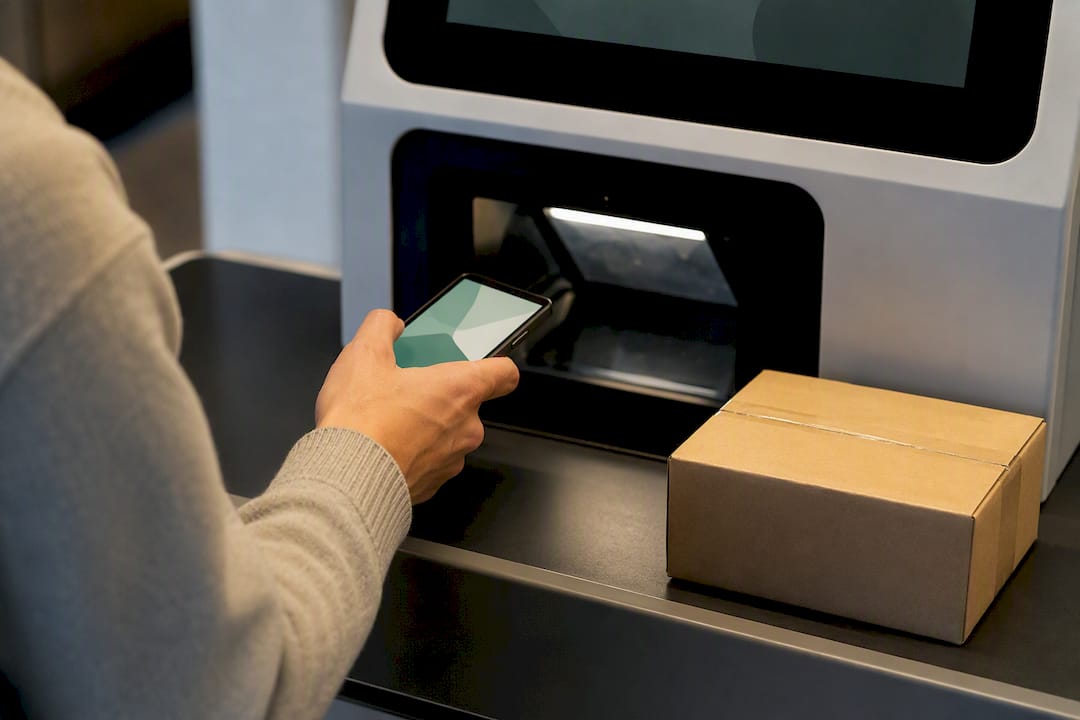
- Use scan-to-print through Label Broker. USPS Label Broker lets someone show a QR code or an 8 to 10 character Label Broker ID right at a participating Post Office counter or self-service kiosk, where staff or the kiosk prints and applies the physical label for free. This is the single biggest friction-remover for anyone without home printing access.
- Try Label Delivery Service or Click-N-Ship’s print-later option. Click-N-Ship supports a “print later at Post Office” workflow, and USPS also offers a paid Label Delivery Service for cases where mailing a physical label makes more sense than relying on a phone screen.
- Fall back on a local library, print shop, or mailed hard copy. If someone has no smartphone and no printer, mailing them a printed label or pointing them toward a library print station covers the gap.
Pro Tip: If you’re the one sending the label to someone else, always text or email the tracking number separately from the label itself. QR codes and PDFs get lost in group texts and downloads folders; a plain typed number in a message thread almost never does.
The QR and Label Broker workflow has genuinely changed the return experience for people without home printers, turning what used to require a trip to a print shop into a five-minute counter visit.
Tracking a Prepaid Label Step by Step
Once the label exists and the package is moving, three tools cover almost every tracking need.
USPS.com or the USPS Mobile app. Type or paste the tracking number into the tracking field and you’ll see every scan event, from acceptance through delivery, along with estimated delivery windows when available.
Text tracking through 2USPS. Text the tracking number to 28777 and USPS sends status updates directly to your phone. Reply STOP at any point to cancel the messages.
Merchant or carrier email and text alerts. Retailers and buyback services often enroll customers in automated tracking notifications the moment a label ships, and USPS itself offers text and email updates for a limited window after you register the number, typically covering about two weeks of activity.
A few limits worth knowing before you rely on any single source:
- USPS.com shows the most detail, including facility-level scans; the app mirrors that data with a friendlier interface.
- Text alerts are lighter, usually just major status changes like acceptance, out for delivery, and delivered.
- Proof-of-delivery details, like a signature image, may require a separate request even after a “delivered” scan appears.
Fixing Common Prepaid Label Tracking Problems
Most tracking frustration comes down to four repeatable problems, and each has a fairly quick fix.
- Lost the tracking number. Check your Shipping History first, then the original confirmation email, then the sales receipt if the label was bought in person. Recipients can check Informed Delivery or simply ask the sender to resend the number.
- Expired or voided label. USPS labels have a validity window, and unused Click-N-Ship labels are generally eligible for a refund request if voided before use. Void it as soon as you know it won’t be used rather than letting it sit.
- Postage due from a weight mismatch. If the actual package weighs more than what the label was purchased for, USPS can mark it postage due rather than deliver it outright. Weigh the box before printing and add a small buffer if you’re unsure.
- No scans appear at all. First confirm in Shipping History that the label was actually created correctly. If it was and there’s still no acceptance scan after a reasonable processing window, file a Missing Mail inquiry and hold on to your proof of shipment in case a claim follows.
One detail that trips up a surprising number of people reusing old boxes: automated sorting machines read the first barcode they detect, so an old shipping label left on a reused box can hijack the scan and send tracking updates for the wrong shipment entirely. Cover or remove every old barcode before applying a new prepaid label.
Prepaid Label Tracking in a Device Buyback Flow
A typical device buyback runs through four steps: get an instant quote, receive a free prepaid label, ship the device, and wait for inspection and payment, with guidance on where you’ll get the most cash. Tracking is the thread connecting all four, because inspection can’t start until a delivery scan confirms the package actually arrived.
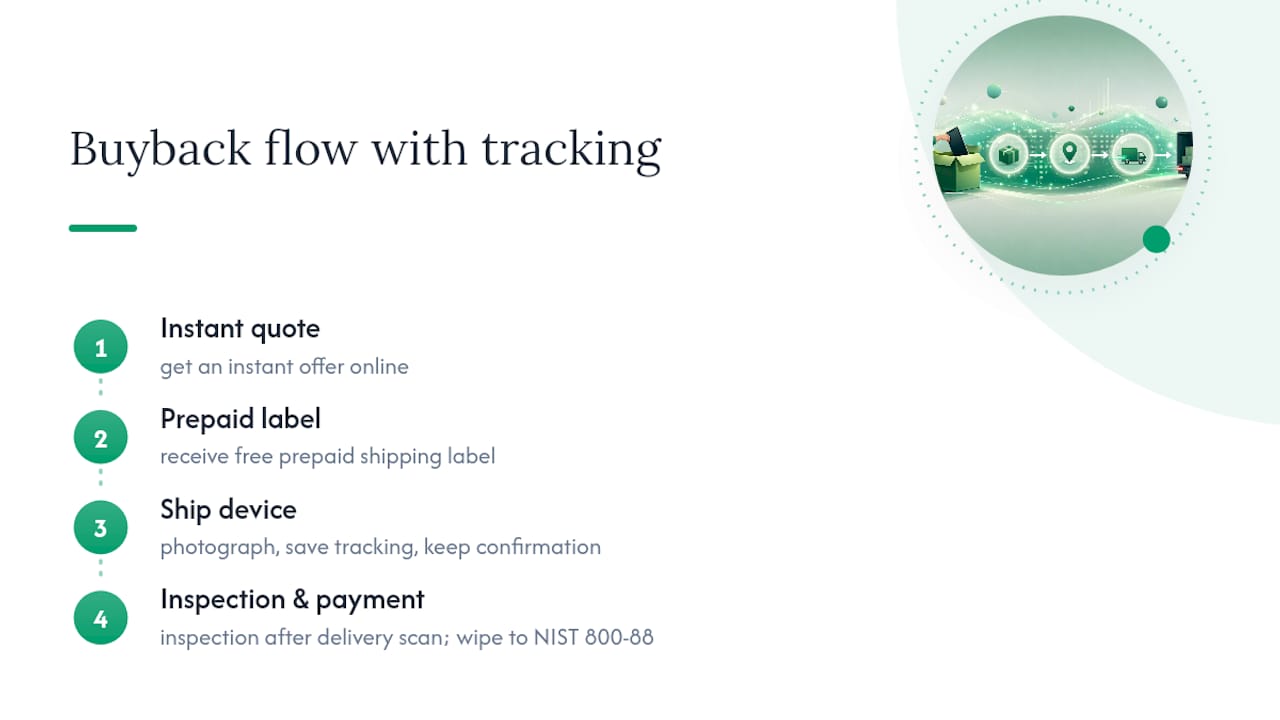
That delivery scan is also what protects the payout timeline. If a seller keeps their tracking number and watches for the delivered status, they know exactly when inspection should begin, and they have documented proof of shipment if a dispute ever comes up over “we never received it.” That habit matters just as much for mail-in electronics recycling as it does for a straightforward buyback, since both rely on the same scan-to-inspection sequence.
On the security side, once a device reaches inspection, the wipe process should follow a documented standard. Buybackbear wipes every device to the NIST 800-88 standard and issues a free Certificate of Data Erasure after inspection confirms the device.
Before shipping, sellers should do three things: photograph the device and packaging before sealing the box, save the tracking number somewhere outside the shipping app, and hold onto the delivery confirmation until payment actually lands. That last step alone shortens most inspection disputes to a quick reference check instead of a back-and-forth argument.
Why Small Tracking Habits Save Real Money
The pattern behind most shipping disputes isn’t fraud or carrier failure. It’s someone losing a tracking number three days after printing a label and then having no way to prove anything happened. Tracking is proof of shipment, and proof of shipment is what settles a disagreement before it becomes one.
The fix costs nothing and takes seconds: screenshot the barcode, paste the number somewhere durable, and check status once a day instead of waiting until something feels wrong. Sellers who treat that as a mandatory step, not an optional one, run into far fewer stalled payouts and far fewer “it never arrived” conversations.
, Andy
Sell Your Device With a Tracked, Free Prepaid Label
Selling a phone through a carrier trade-in usually means bill credit spread across two or three years of statements. Cash payment is sent the same day the device is inspected, without a contract attached.

Every quote includes a prepaid shipping label, so tracking your device from drop-off to inspection works as described above: save the number, watch for the delivery scan, and expect an update once your device is checked. Devices are wiped according to recognized data erasure standards with a Certificate of Data Erasure included, whether you’re selling one device or clearing out several. If you’re weighing a trade-in against a straight cash sale, the trade-in versus sell comparison breaks down where each option actually pays off.
Have your device model and condition ready, then get an instant quote and start your free prepaid label today.
Official Resources for Live Rules and Tools
For current procedures, check USPS Tracking basics, Label Broker, and Click-N-Ship directly, since carrier tools and policies change over time.
Sources
- USPS Tracking® - The Basics
- How to Create & Send a Prepaid Shipping Label (2026) | ShippingLabel
- USPS Domestic Mail Manual. Preparing packages
FAQ
How Do You Track a USPS Prepaid Envelope?
Enter the tracking number from the label or receipt into USPS.com or the USPS Mobile app; if you registered for text alerts, you’ll also get updates by texting the number to 28777.
Can You Track Any Shipping Label, Not Just Paid Ones?
Yes. A prepaid label uses the identical carrier barcode and tracking system as a label purchased at full price; the payment method has no effect on how the package is scanned or tracked.
Will USPS Print a Prepaid Label for You?
Yes, through Label Broker: bring a QR code or Label Broker ID to a participating Post Office counter or self-service kiosk and staff or the kiosk will print and apply the label at no extra cost.
Can USPS Scan a Prepaid Label Correctly if the Box Was Reused?
Only if old barcodes are removed or fully covered first, since sorting machines read the first barcode they detect and a leftover label can send the package’s tracking data to the wrong record entirely.
What Should You Do if a Prepaid Label Shows No Scans?
Check the sender’s Shipping History to confirm the label was created correctly, allow a normal processing window, and file a Missing Mail inquiry if the acceptance scan still hasn’t appeared.
Recommended
Ready to sell?
Get an instant quote, free prepaid shipping, and fast cash that beats carrier trade-in credit.
Selling your device here, at a glance
Get my instant quote →- Instant quote in about 30 seconds, price locked while you decide
- Cash by PayPal, Zelle, Venmo or check after inspection, no fees
- Free prepaid label both ways, free return shipping if you decline
- We beat any competitor's written quote by $2
- Cracked screen, broken or won't power on? Still worth real money
- Certified NIST 800-88 data wipe with an emailed certificate
- Trade-in value paid in cash, not a 24-36 month carrier bill credit
- Every model priced: unlocked or carrier-locked, any storage size