Remove a Samsung Account in 6 Steps and Prep Your Galaxy to Sell
September 2, 2026
To remove a Samsung account from a Galaxy phone, go to Settings → Accounts and backup → Manage accounts → Samsung account → Remove account, then sign out. That only unlinks the device; the account still exists online. To permanently delete it, visit account.samsung.com, open Profile → Manage Samsung account → Delete account, and confirm. Deletion is irreversible, so if you’ve forgotten your password, reset it first.
TL;DR:
- Removing a Samsung account from your device signs it out and halts syncing, but the account remains active on Samsung’s servers unless you delete it online.
- To delete the account permanently, you must log in to Samsung’s website, confirm your identity, and accept the risks of irreversible data loss and disconnected services.
- Proper device preparation before selling involves disabling Find My Mobile and Reactivation Lock, removing all linked accounts, backing up data, and performing a factory reset in the correct order.
- Using support channels for account recovery or resolving payment holds is essential if you cannot reset the password or access the linked email.
- Rushing steps or performing actions out of sequence increases the risk of device lockouts or lower resale offers; sequence and verification are key.
Table of Contents
- How to remove a Samsung account from a Galaxy phone or tablet
- How to permanently delete your Samsung account
- Forgot your password or lost access to the linked email?
- Getting a device ready to sell or trade in
- What happens to your device after Buybackbear buys it
- When to contact Samsung or your carrier directly
- Official support pages and a partner resource
- Why most guides skip the part that actually matters
- Sources
- FAQ
How to remove a Samsung account from a Galaxy phone or tablet
Removing a Samsung account from your device is the move to make when you want to stop syncing but keep the account itself intact, like handing a phone to a family member or troubleshooting a sync glitch. It’s the “sign out” option, not the “delete forever” one.
Here’s the exact path Samsung support lists for removing accounts from a Galaxy phone or tablet:
- Open Settings on your Galaxy device.
- Tap Accounts and backup, then Manage accounts.
- Select your Samsung account from the list.
- Tap Remove account.
- Confirm by entering your Samsung account password when prompted.
- Tap OK to finish signing out.
Once you confirm, the device stops syncing contacts, Samsung Cloud data, and app settings tied to that account. The phone itself becomes unregistered from your account, but the account still lives on Samsung’s servers, ready to be added again later on this device or a new one. This is the same core process Samsung documents on its Latin America support page, which confirms the password prompt is a required step, not optional.
Menu wording shifts slightly depending on your One UI version. Older Android releases sometimes bury “Manage accounts” a tap deeper, under Settings → General management → Accounts, or Samsung labels the same menu “Cloud and accounts.” If “Remove account” appears grayed out, check whether Find My Mobile is still active or whether a device policy (common on work phones) is blocking account changes.
Pro Tip: If removal fails silently, restart the device once and try again before assuming something is broken. A stuck sync process is a more common culprit than an actual account lock.
How to permanently delete your Samsung account
Deleting your Samsung account is a different, much bigger decision than removing it from a device. This wipes the account from Samsung’s servers entirely, and there’s no undo button once you confirm.
The process happens on the web, not on the phone itself. Sign in at account.samsung.com, then go to Profile → Manage Samsung account → Delete account. Samsung walks you through a list of everything tied to that account before letting you confirm, and you have to actually scroll through and accept the terms before the delete button activates.
What you lose permanently:
- Purchase history from Galaxy Store and Samsung’s other storefronts
- Samsung Cloud backups, including photos, contacts, and Samsung Notes
- Active subscriptions linked to the account
- Your Samsung profile data and account preferences
A few things need to happen before Samsung lets you finish. Sign out of every device linked to the account first. Deleting the account online does not automatically sign out devices still connected to it, according to Samsung’s own account management guidance, which means a phone still logged in could lose your ability to remotely manage or wipe it later. If you’re a family organizer, Samsung requires you to remove any child accounts under your management before it lets you delete your own. And if there’s an unresolved payment, like a pending Galaxy Store charge, deletion gets blocked until that’s cleared up.
Forgot your password or lost access to the linked email?
You can’t remove or delete a Samsung account without proving its yours, and that usually means a working password or email access.
Start with Samsung’s password reset flow. It sends a reset link to the email tied to the account, and Samsung may ask you to verify your identity through a code or security question before letting the reset go through.
- Go to Samsung’s account recovery page and enter your account ID or email.
- Choose password reset and check your inbox for the verification link.
- Follow the prompts to set a new password.
- If you no longer control that email, use the account recovery options for lost email access, or contact Samsung Support directly with proof of ownership.
If none of that works and you’re locked out completely, a factory reset is the last resort, but it’s risky. Resetting a device while still signed into a Samsung account you can’t access can trigger Reactivation Lock, leaving the phone stuck at setup. Have your device serial number or IMEI, original proof of purchase, and any account ID information ready before contacting support. It speeds things up considerably and often is the difference between a same-day fix and a week of back-and-forth.
Getting a device ready to sell or trade in
Selling a Samsung phone with the account still active is one of the most common reasons trade-ins get rejected or devices come back to sellers unsold. Reactivation Lock is designed to stop stolen phones from being resold, but it doesn’t know the difference between a thief and a legitimate seller who forgot a step.
Work through this before you box up the device:
- Disable Find My Mobile and Reactivation Lock in Samsung’s settings, verifying with your password when asked.
- Remove your Samsung account, then sign out of your Google account too (the process is nearly identical if you need a refresher on Android account removal).
- Unlink any paired Galaxy Watch or Galaxy Buds, and remove carrier accounts if applicable.
- Back up contacts, photos, and Samsung Notes to a computer or cloud storage, since none of that transfers automatically once the account is gone.
- If you’re switching numbers or devices, transferring your contacts beforehand saves you from losing them mid-process.
- Only run the factory reset after confirming you’re signed out, then check that the phone boots to the initial setup screen instead of asking for old credentials.
Pro Tip: Take a screenshot after disabling Reactivation Lock. If a buyer or buyback service flags the device as locked days later, you’ll have proof it was off when it left your hands.
What happens to your device after Buybackbear buys it
Once a Samsung phone arrives with the account already removed and Reactivation Lock disabled, the rest of the process moves fast. Buybackbear gives an instant online quote, ships a prepaid label, and pays the same day the device passes inspection.
- Every device gets wiped to the NIST 800-88 standard, with a Certificate of Data Erasure issued afterward.
- Devices too damaged for resale are recycled responsibly instead of thrown away.
- Carrier locks, cracked screens, or a still-active Samsung account can lower an offer or delay payout while the issue gets resolved.
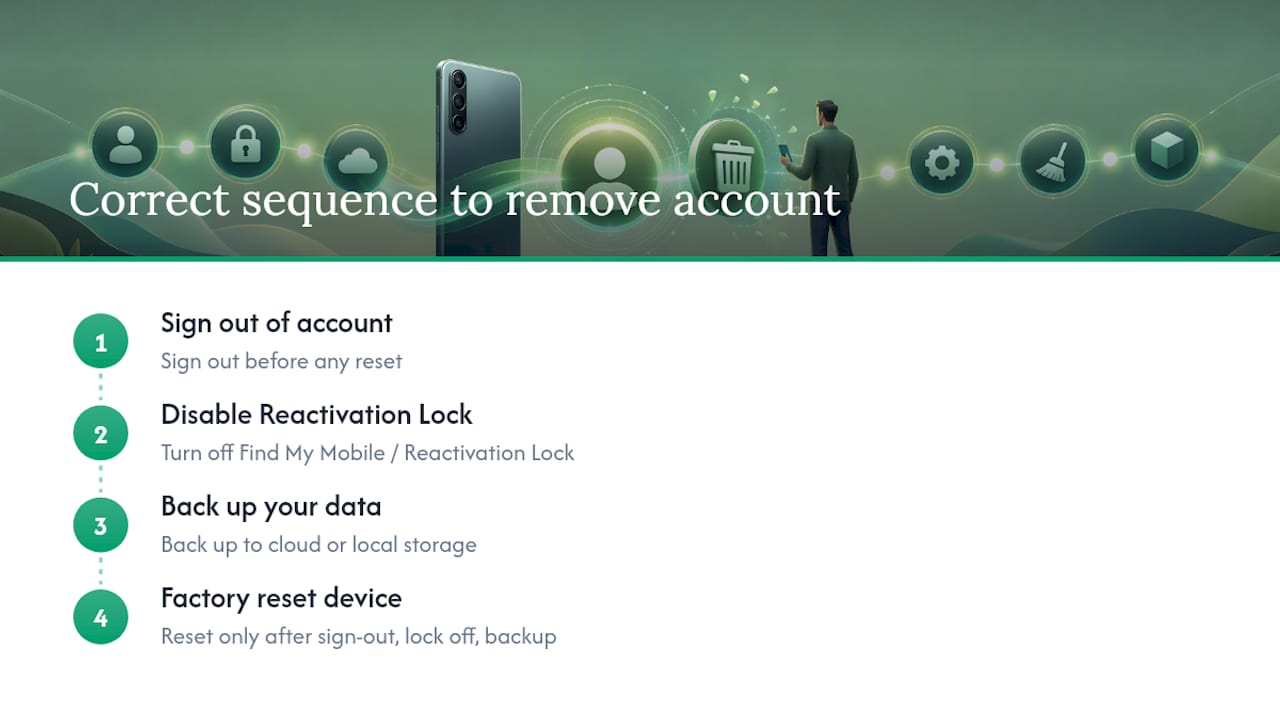
- The recommended order is simple: sign out, disable Find My Mobile, back up your data, factory reset, then ship.
Skipping that order is the single biggest reason sellers see a lower offer than expected.
When to contact Samsung or your carrier directly
Some account issues need a real support ticket, not another attempt at the same settings menu.
- Contact Samsung Support for account recovery, unresolved Galaxy Store payments, or family account deletion conflicts.
- Contact your carrier if the device shows a network lock or a payment hold that’s blocking removal or resale, since that’s outside Samsung’s control.
- Have your device’s IMEI or serial number, proof of purchase, your Samsung account ID, and a screenshot of any error message ready. It cuts resolution time down significantly.
Official support pages and a partner resource
For the exact steps and terms Samsung uses, these are the primary sources behind this guide:
- Remove accounts from your Galaxy phone or tablet (Samsung support)
- How can I delete my Samsung account? (Samsung support)
- Samsung Reactivation Lock (T-Mobile support)
- How to transfer contacts before phone service (RepairGeniuses)
Why most guides skip the part that actually matters
Most articles on this topic treat account removal as an end in itself, a box to check before moving on. That misses the point for anyone actually planning to sell or hand off a device. The instructions matter less than the order you do them in.
The mistake I see most often isn’t forgetting to sign out. It’s disabling Find My Mobile too late, after a factory reset already locked the phone against the original account. Samsung’s own guidance treats Reactivation Lock as a security feature, and it is one, but that same feature turns into a headache the moment you’re the legitimate seller stuck outside your own device.
If you take one thing from this guide, prioritize sequence over speed: sign out, kill the lock, back up your data, then reset. Rushing any of those steps out of order is what turns a five-minute task into a support ticket. Ready to turn that prepped device into cash? Get an instant quote for your Galaxy phone and see what same-day payment actually looks like.
, Andy
Sources
- Remove accounts from your Galaxy phone or tablet
- How can I delete my Samsung account?
- Samsung Reactivation Lock (T-Mobile support)
FAQ
How Do I Remove the Previous Owner’s Samsung Account?
If you bought a used device that’s still signed into someone else’s Samsung account, ask the previous owner to remove it remotely or sign in and remove it themselves through Settings → Accounts and backup → Manage accounts. If that’s not possible and Reactivation Lock is active, you’ll need proof of purchase to work with Samsung Support on unlocking it.
What Happens if I Remove My Samsung Account From My Phone?
The device stops syncing Samsung Cloud data, contacts, and app settings, and it’s unregistered from that account, but the account itself stays active on Samsung’s servers and can be signed back in anytime.
Why Do I Have a Samsung Account on My Phone?
Galaxy devices set up a Samsung account automatically during initial setup to enable Samsung Cloud backup, Galaxy Store purchases, Find My Mobile, and Samsung Health syncing.
How Do I Reset a Samsung Phone Without the Account Password?
Reset the password first through Samsung’s account recovery page; if you can’t access the linked email either, contact Samsung Support with proof of purchase, since resetting the device without removing the account first can trigger Reactivation Lock.
Recommended
Ready to sell?
Get an instant quote, free prepaid shipping, and fast cash that beats carrier trade-in credit.
Selling your device here, at a glance
Get my instant quote →- Instant quote in about 30 seconds, price locked while you decide
- Cash by PayPal, Zelle, Venmo or check after inspection, no fees
- Free prepaid label both ways, free return shipping if you decline
- We beat any competitor's written quote by $2
- Cracked screen, broken or won't power on? Still worth real money
- Certified NIST 800-88 data wipe with an emailed certificate
- Trade-in value paid in cash, not a 24-36 month carrier bill credit
- Every model priced: unlocked or carrier-locked, any storage size