Sell a Broken Laptop for Cash: Fast, Safe Options
August 8, 2026
Yes, you can get cash for a broken laptop. Most buyback services, pawn shops, and online marketplaces will pay something for a damaged device, even one that won’t power on. The fastest, lowest-risk route is a cash-focused buyback service that sends a free prepaid label, wipes your drive to the NIST 800-88 standard, and pays you the same day it inspects the device.
Your three fastest options at a glance:
- Cash buyback service (e.g., Buybackbear): instant quote online, free shipping, same-day payment
- Local pawn or repair shop: walk in, get an offer on the spot, leave with cash
- Certified mail-back recycling with payout: slower, but provides a Certificate of Destruction
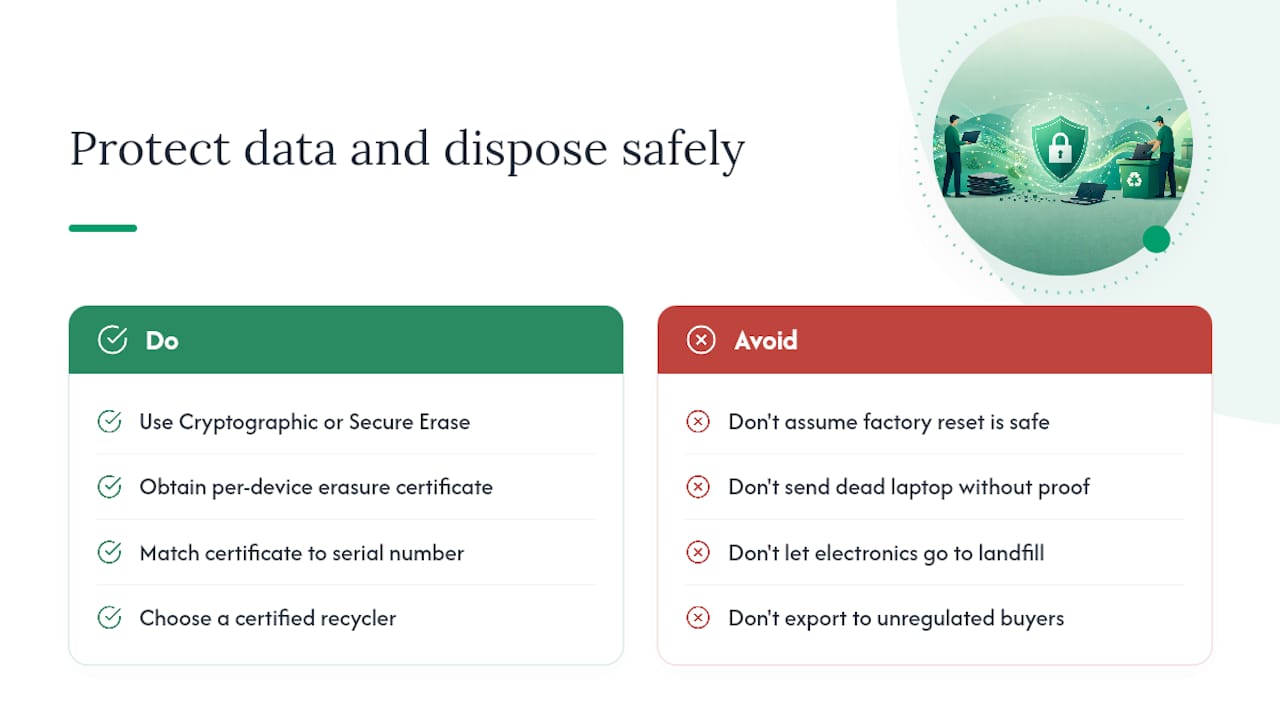
Pro Tip: Before you do anything else, treat the internal drive as sensitive. A factory reset does not permanently erase data. Use NIST 800-88 Clear or Purge methods if the drive is accessible, or hand the device to a certified buyer who handles that step for you.
Key Takeaways
A cash buyback service with prepaid shipping, NIST 800-88 wipes, and same-day payment is the fastest and most secure way to sell a broken laptop for cash.
| Point | Details |
|---|---|
| Most broken laptops have value | Even dead devices can yield cash through parts salvage or certified recycling programs. |
| Data security is non-negotiable | A factory reset is insufficient; use NIST 800-88 Clear/Purge or request certified destruction. |
| Powers-on devices pay more | A laptop that boots with defects commands a significantly higher offer than one that is completely dead. |
| Battery safety matters | Damaged lithium-ion batteries require special handling; follow carrier and recycler rules before shipping. |
| Buybackbear covers the full process | Instant quote, free prepaid label, same-day cash payment, NIST-compliant wipe with certificate, and certified recycling for unsellable devices. |
Table of Contents
- Which selling route is right for your situation?
- How to prepare your broken laptop before you sell it
- Why a cash buyback service is often the fastest, lowest-risk choice
- What to do when your laptop can’t be sold
- How to sell a broken laptop with Buybackbear, step by step
- The case for doing this right the first time
- Buybackbear pays cash for broken laptops, fast
- Useful sources
- FAQ
Which selling route is right for your situation?
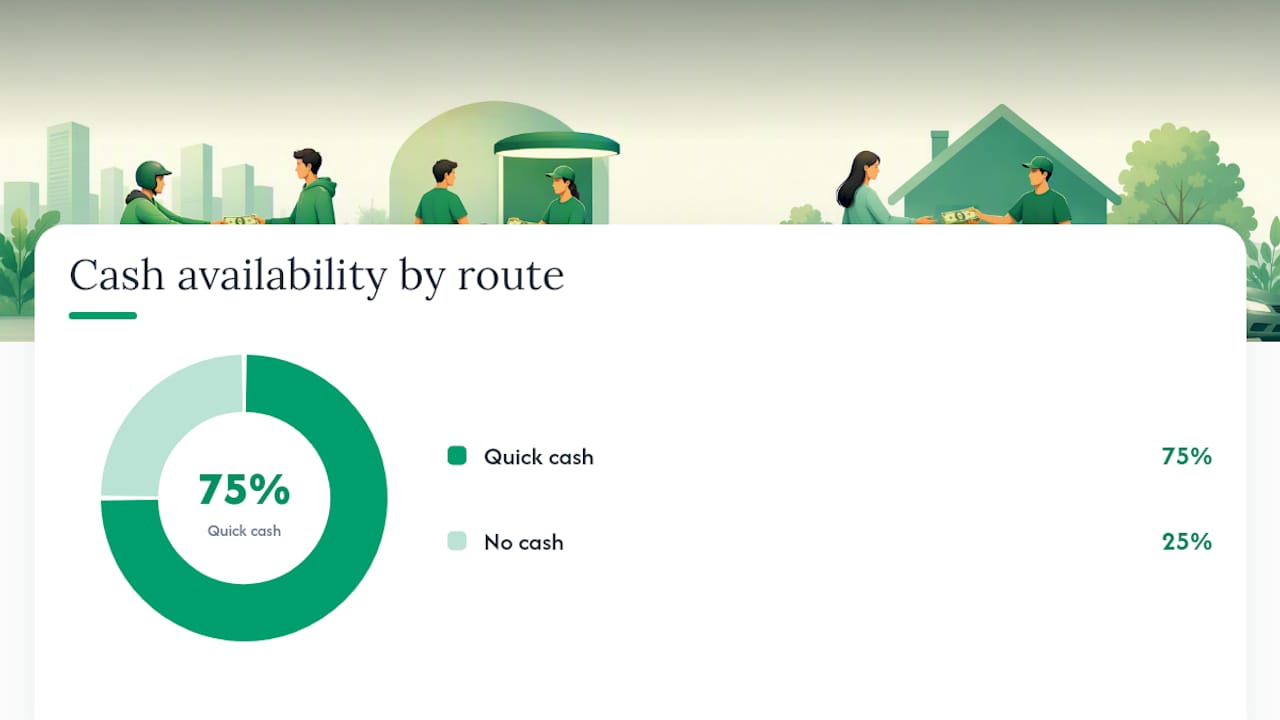
Different routes suit different priorities. Here’s how the main options compare:
| Option | Accepted condition | Payment type and speed | Data security | Shipping cost | Environmental handling |
|---|---|---|---|---|---|
| Cash buyback service | Broken, cracked, dead | Cash, same-day on inspection | NIST 800-88 wipe + certificate per device | Free prepaid label | Certified recycling for unsellable devices |
| Local pawn/repair shop | Broken, cracked | Cash, immediate | Varies; ask for on-site wipe | You bring it in | Varies by shop |
| Online marketplace | Broken, cracked | Cash, same day after inspection | Buyer’s responsibility | You pay or negotiate | No guarantee |
| Donation/certified recycling | Repairable or dead | None (tax receipt possible) | Certificate of Destruction available | Varies; some free mail-back | R2 or e-Stewards certified |
Sellers who need cash today should skip marketplaces. Listing a damaged laptop on a peer-to-peer platform means photographing it, writing a description, fielding lowball offers, and waiting for payment to clear. A buyback service collapses that into one form and a shipping label.
Mail-back programs with NAID AAA certification provide chain-of-custody tracking and certificates of destruction, which matters if you’re disposing of a work device or want documented proof the drive was destroyed.
How to prepare your broken laptop before you sell it
Security first, then packaging. Do these steps in order.
- Remove external storage: pull any USB drives, SD cards, or dongles.
- Photograph the serial number and visible damage: you’ll need the serial for your quote and the photos protect you if a dispute arises.
- Include the charger if you have it: most buyers pay more when accessories are present.
- Handle the drive by its condition: if the laptop powers on, follow NIST SP 800-88 Clear or Purge guidance before shipping. SSDs and NVMe drives need Secure Erase or Cryptographic Erase, not a simple overwrite. If the drive is inaccessible, treat it as requiring physical destruction by the receiving party.
- Battery and packaging: lithium-ion batteries can ignite if damaged or improperly packed. Remove the battery if your model allows it, or follow your carrier’s specific rules. Use firm padding and a snug box to prevent movement in transit.
Pro Tip: Request a Certificate of Data Erasure tied to your device’s serial number, not just a generic receipt. Keep it alongside your serial photos. That combination is your proof if questions arise later.
A factory reset or standard format leaves data recoverable. Security experts recommend a two-step approach: logical sanitization when the drive is accessible, physical destruction when it isn’t.
Why a cash buyback service is often the fastest, lowest-risk choice
Speed and security are the two things most sellers care about, and a good buyback service delivers both without requiring you to become an expert in either.
- Per-device Certificate of Data Erasure: Buybackbear’s certified data destruction process follows NIST 800-88 and issues a certificate tied to each device’s serial number.
When vetting any buyback service, check for three things: written quote terms that hold through inspection, an explicit NIST 800-88 or equivalent data-wipe commitment, and a stated recycling path for devices that can’t be resold. A buyer who can’t answer those three questions clearly isn’t worth the risk.
What to do when your laptop can’t be sold
If the device is truly unsellable, donation or certified recycling is the responsible path.
- Certified recycling: the EPA recommends R2 or e-Stewards certified recyclers to keep electronics out of unsafe waste streams. These programs include data security and worker safety practices.
- Mail-back destruction programs. NAID AAA-certified services accept broken laptops, provide chain-of-custody tracking, and issue certificates of destruction. Most require battery removal or special packaging before shipping.
Federal electronics stewardship strategy has pushed for more certified recyclers and public-private partnerships to improve safe handling. Choosing an R2 or e-Stewards facility puts your device in that system rather than an unregulated export stream.
How to sell a broken laptop with Buybackbear, step by step
- Get an instant quote: go to Buybackbear’s laptop sell page and enter your model, storage size, and a description of the damage. Have the serial number and charger status ready.
Pro Tip: Businesses or anyone disposing of multiple devices can use Buybackbear’s bulk buyback program for fleet-level NIST-compliant wipes and consolidated certificates.
The case for doing this right the first time
Most people treat selling a broken laptop as a minor errand. It isn’t. The drive in that chassis may hold years of passwords, tax documents, and login tokens, and a standard factory reset leaves all of it recoverable with free software.
The conventional advice is to “wipe it before you sell it,” which sounds simple until you realize that wiping an SSD correctly requires Cryptographic Erase or Secure Erase, not a drag-to-trash and empty. A dead laptop is actually the harder case: if you can’t boot it, you can’t wipe it yourself, which means you’re trusting whoever receives it to handle the drive responsibly.
That’s why the certificate matters more than most sellers realize. A per-device Certificate of Data Erasure tied to your serial number is the only documentation that proves the drive was sanitized to a recognized standard. Without it, you’re taking someone’s word for it.
The environmental side is equally underappreciated. Lithium-ion batteries in landfills leach heavy metals. Unregulated electronics exports ship hazardous materials to countries with no worker protections. Choosing a certified recycler isn’t a feel-good extra; it’s the difference between responsible disposal and passing the problem to someone else.
Buybackbear pays cash for broken laptops, fast
Carrier trade-ins give you bill credit spread over years. Pawn shops give you a fraction of parts value with no data guarantee. Buybackbear gives you real cash the same day your device is inspected, with a free prepaid label, a NIST 800-88 compliant wipe, and a Certificate of Data Erasure for every device.

Broken screen, dead battery, won’t power on. Buybackbear accepts laptops in all conditions and pays via PayPal, Venmo, debit card, or bank transfer. Devices that can’t be resold go to certified recyclers, not landfill. Businesses and schools can use the bulk buyback program for fleet disposal with consolidated certificates. Get your instant quote at Buybackbear’s laptop page and have a prepaid label in your inbox today.
Useful sources
- SP 800-88 Rev. 2, Guidelines for Media Sanitization | CSRC
- Electronics Basic Information, Research, and Initiatives | US EPA
- How to securely wipe a hard drive before selling. NIST 800-88 explained - DEV Community
- How to Recycle Broken Devices Using Mail-Back Data Destruction Programs – desksetuppro.com
- Certified Data Destruction (NIST 800-88) | BuyBackBear
- Sell Business Electronics in Dallas. Paid, Not Recycled | BuyBackBear
- US strategy to improve electronics stewardship | US EPA
Before shipping to any buyer or recycler, verify their R2, e-Stewards, or NAID AAA certification. A certificate is only as trustworthy as the organization issuing it.
FAQ
Can you get money for a broken laptop?
Yes. Most broken laptops have cash value through buyback services, pawn shops, or parts buyers, even if the device won’t power on. Payout depends on model, age, whether it boots, and component condition.
Can you sell a broken laptop to Best Buy?
Best Buy’s trade-in program accepts some damaged devices for store credit, but broken or non-functional laptops are often declined or valued at near zero. A dedicated buyback service typically pays more cash for damaged devices.
What should I do with a broken laptop I can’t sell?
Donate it if it’s repairable and meets the recipient’s minimum specs. If it’s truly dead, use an EPA-recommended certified recycler (R2 or e-Stewards) or a NAID AAA mail-back destruction program that issues a Certificate of Destruction.
How do I protect my data before selling a broken laptop?
A factory reset is not enough. Follow NIST SP 800-88 Clear or Purge methods if the drive is accessible. If the laptop won’t boot, send it to a certified buyer like Buybackbear that performs NIST-compliant wipes and issues a per-device Certificate of Data Erasure.
How fast does Buybackbear pay for a broken laptop?
Buybackbear pays the same day it inspects your device, via PayPal, Venmo, debit card, or bank transfer. Shipping is free with a prepaid label, and every device receives a Certificate of Data Erasure.
Recommended
Ready to sell?
Get an instant quote, free prepaid shipping, and fast cash that beats carrier trade-in credit.
Selling your device here, at a glance
Get my instant quote →- Instant quote in about 30 seconds, price locked while you decide
- Cash by PayPal, Zelle, Venmo or check after inspection, no fees
- Free prepaid label both ways, free return shipping if you decline
- We beat any competitor's written quote by $2
- Cracked screen, broken or won't power on? Still worth real money
- Certified NIST 800-88 data wipe with an emailed certificate
- Trade-in value paid in cash, not a 24-36 month carrier bill credit
- Every model priced: unlocked or carrier-locked, any storage size