Wipe a Windows Laptop Before Selling: Reset, Verify, Get NIST Proof
September 7, 2026
The fastest reliable path is Windows Reset with “Remove everything” and the “Clean the drive” toggle turned on. That works for most laptops headed to a new owner. If your drive is an SSD, holds regulated or sensitive data, or you need proof the wipe actually worked, skip straight to firmware secure erase, cryptographic erase, or a certified erasure service. And if BitLocker is active, dig up your recovery key before you touch anything.
TL;DR:
- A standard Windows reset with “Clean the drive” can take several hours on mechanical hard drives and less than an hour on SSDs, but may not fully erase SSD data due to wear-leveling algorithms.
- Firmware-level commands like ATA Secure Erase or NVMe Sanitize, or cryptographic erase by destroying encryption keys, are necessary for thoroughly erasing SSDs.
- Verification involves booting into setup mode, running file-recovery scans, and obtaining an erasure certificate for regulated data or business use.
- For damaged drives or sensitive data, professionals using certified erasure services that comply with NIST 800-88 standards and document chain of custody are recommended.
- The most reliable way to ensure data is gone is pairing a reset with firmware or cryptographic erasure and verifying the drive is clean before selling.
Table of Contents
- How Do You Wipe a Windows Laptop Before Selling It?
- Check Disk Encryption and Collect Your BitLocker Recovery Key
- Step-by-Step: Reset This PC From Settings
- Why SSDs Need More Than a Standard Overwrite
- How Do You Know the Wipe Actually Worked?
- When to Use a Certified Erasure Service Instead
- What Actually Matters When You’re Selling a Wiped Laptop
- Get Paid Cash for the Laptop You Just Wiped
- Sources
- FAQ
How Do You Wipe a Windows Laptop Before Selling It?
Before you reset anything, spend five minutes protecting yourself. Skipping this step is how people lose family photos or hand a buyer access to their old Microsoft account.
- Back up everything you want to keep. Copy files to an external drive or a cloud service like OneDrive or Google Drive. Once “Remove everything” runs, that data is gone.
- Sign out of every account. Log out of your Microsoft account, Office, iCloud (if installed), and any browser profiles, then unlink the device from your Microsoft account online so it stops showing up in your device list.
- Pull out removable storage. Check for a microSD card or external drive plugged into a USB port, and jot down the laptop’s serial number for your own records before it changes hands.
- Find your BitLocker recovery key now, not during the reset. You will need it if the process pauses to ask for it.
Check Disk Encryption and Collect Your BitLocker Recovery Key
Open Settings, then go to Privacy & Security, then Device Encryption (or search “BitLocker” directly) to see if encryption is active. Most laptops sold since 2018 ship with device encryption on by default, which changes your wipe strategy in a useful way.
Here’s where recovery keys usually hide:
- Your Microsoft account page, under devices, if you ever signed in with a Microsoft account
- Your organization’s Azure AD or Intune portal, for work laptops
- A printed copy or USB drive you saved when encryption was first turned on
If encryption was enabled from the moment you started using the laptop, destroying the key can function as a legitimate cryptographic erase under NIST’s sanitization framework. That only holds true if the encryption was set up properly from day one. Turning it on right before you sell the machine does nothing for data that was written earlier, unencrypted.
Pro Tip: If you truly cannot locate the recovery key and the reset gets stuck asking for it, boot into Windows Recovery Environment and choose “Remove everything” from there instead of Settings. WinRE can bypass a locked screen that Settings cannot.
Microsoft explicitly warns that a missing recovery key can block the reset from completing, so track it down before you start, not after Windows asks for it.
Step-by-Step: Reset This PC From Settings
This is the workflow most sellers should run first.
- Open Settings → System → Recovery.
- Under “Reset this PC,” click Reset PC.
- Choose Remove everything (never “Keep my files” when you’re handing the laptop to someone else).
- Pick Cloud download if you have a fast, unmetered internet connection and want the freshest Windows build installed. Pick Local reinstall if you’re on limited data or want a faster process using files already on the drive.
- Click Change settings and turn on Clean the drive. This adds a data overwrite pass on top of the standard reset.
- Confirm and let it run.
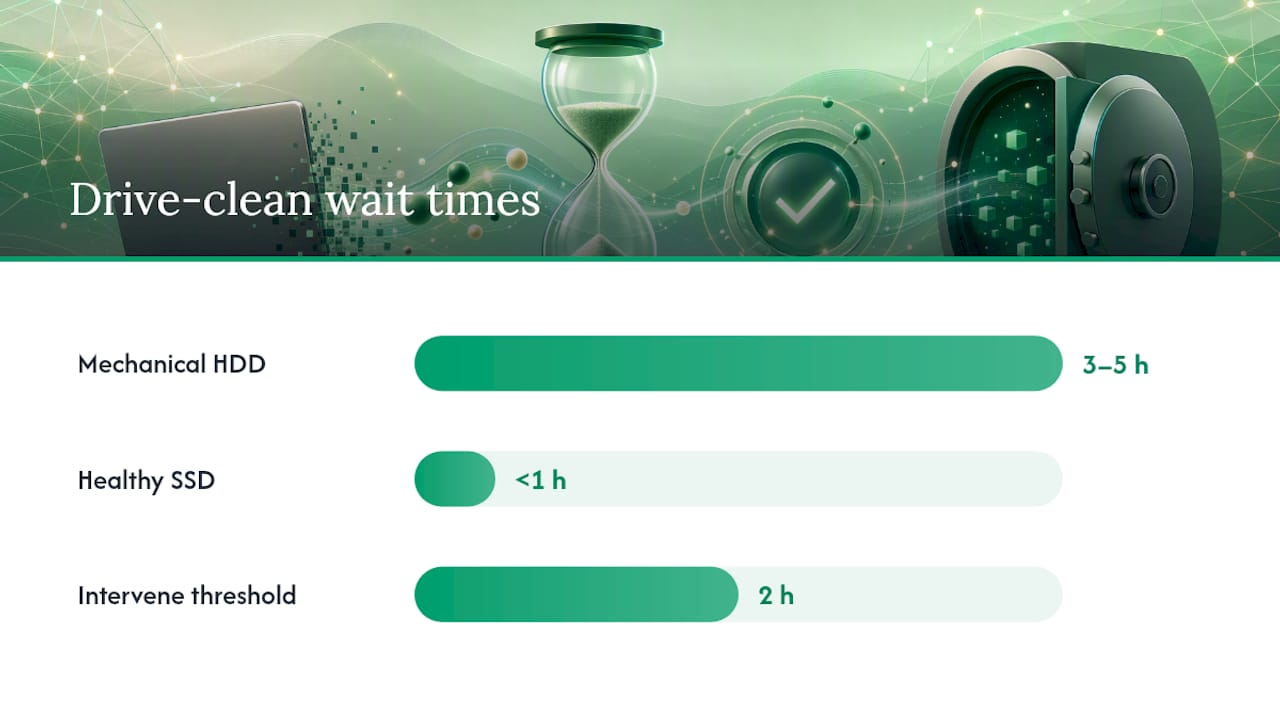
Expect a long wait. Microsoft notes that enabling “Clean the drive” can add several hours to the process depending on your hardware, since it’s writing over the entire drive rather than just deleting file pointers. A mechanical hard drive can take three to five hours with cleaning enabled; a healthy SSD usually finishes faster, sometimes under an hour, because of how flash storage handles writes.
If the screen goes black for an extended stretch or the laptop restarts repeatedly, resist the urge to force a shutdown. That’s normal during the drive-cleaning phase. Only intervene if it sits frozen on the same screen for more than two hours with no disk activity light.
Why SSDs Need More Than a Standard Overwrite
A single overwrite pass, which is exactly what “Clean the drive” performs, was designed with mechanical hard drives in mind. Solid-state drives complicate that. Wear-leveling algorithms and over-provisioned spare blocks mean an SSD’s controller can quietly relocate data to physical cells the operating system never directly addresses again, and a standard overwrite command from Windows may never touch those cells. Industry guidance on device sanitization is blunt about this: overwrite-only methods can fail on SSDs entirely.
Two options handle this properly:
- ATA Secure Erase or NVMe Sanitize. These are firmware-level commands built into the drive controller itself, so they reach every physical cell, including the ones software can’t see.
- Cryptographic erase. Instead of overwriting data, this destroys the encryption keys protecting it, rendering everything unreadable in seconds. It only qualifies as a NIST-defined Purge if the encryption was implemented correctly from the drive’s first use.
Pro Tip: Before running any secure erase, check the drive’s own health metrics with a tool like a storage diagnostic checker so you know whether the SSD is behaving normally or already failing, since a dying drive can abort a sanitize command midway through.
For a laptop with unknown history, a lost encryption password, or genuinely sensitive files, a dedicated erasure utility or a certified erasure service is the more dependable route.
How Do You Know the Wipe Actually Worked?
Verification is where most sellers skip a step they shouldn’t. Multiple industry reports have found that a meaningful share of used drives sold online still contain recoverable personal data after the seller ran a basic factory reset with no follow-up check.
Run these checks before you box the laptop up:
- Boot the machine and confirm it lands on the Windows setup screen (OOBE), not a login prompt tied to your old account.
- Run a file-recovery scan to confirm no personal documents, photos, or browser data are still pullable from the drive.
- Write down the device’s serial number, the wipe method used, and the date and time, and keep that record with your sale paperwork.
- If the buyer is a business or the laptop held regulated data, ask for or generate a formal erasure certificate rather than relying on your own notes.
When to Use a Certified Erasure Service Instead
Doing it yourself makes sense for a personal laptop with ordinary files and a working drive. A few situations tip the scale toward a professional service or physical destruction of the drive.
- The drive is physically damaged, throwing errors, or won’t complete a secure erase command.
- You’re not certain encryption was active from first use, so cryptographic erase can’t be trusted as a Purge method.
- The laptop held regulated data such as financial records, health information, or client files.
- You’re disposing of a fleet of machines at once rather than a single laptop.
If you hire a provider, ask specifically for NIST 800-88 compliance, a serialized certificate tied to that exact device, and a documented chain of custody from pickup to disposal. Businesses retiring multiple devices at once benefit most from this, since a properly run sanitization program keeps devices held back until the erasure record is actually attached to each asset, not released on trust.
What Actually Matters When You’re Selling a Wiped Laptop
Most people treat wiping a laptop as a box to check, then move straight to listing it for sale. That’s backwards. The wipe method you choose is the difference between a clean transaction and a laptop that still has your name buried somewhere on the drive months later.
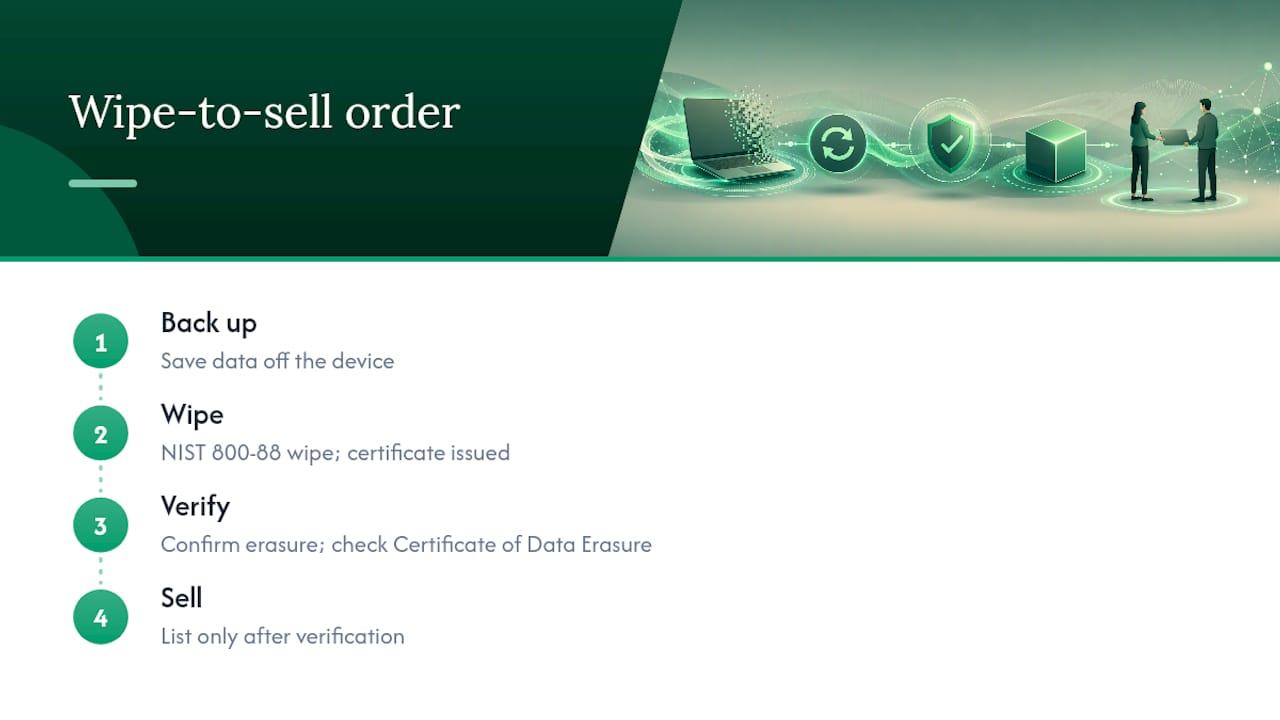
Devices sold through this service are wiped to the NIST 800-88 standard, with a Certificate of Data Erasure provided. That certificate matters more than people expect, because it’s the one piece of paper that proves, to you and to whoever ends up with the machine, that the job was done right.
If there’s one habit worth building, it’s this order: back up, wipe, verify, then sell. Skipping verification is the step almost everyone shortcuts, and it’s the one that actually protects you.
, Andy
Get Paid Cash for the Laptop You Just Wiped
Once your laptop is wiped, the smartest move is turning it into cash instead of letting it sit in a drawer. Payment is made promptly after device inspection, without bill credits or contracts.

The process runs in four steps: get an instant quote online, ship the laptop free with a prepaid label, the device is inspected to confirm the offer, and you get paid by PayPal, Venmo, debit card, or bank transfer. Every laptop is wiped to the NIST 800-88 standard with a Certificate of Data Erasure included, providing documented proof that data has been removed. Businesses retiring multiple laptops at once can use a similar process for bulk disposal with certified erasure records for each unit.
If you’re ready to see what your laptop is worth, check the laptop buyback program and get a quote before you box it up.
Sources
- Reset your PC. Microsoft Support
- Guidelines for Media Sanitization (NIST SP 800-88 Revision 2)
- Data sanitisation at scale: retiring laptops & mobile devices securely. Kefron
FAQ
How Do I Completely Wipe My Computer So I Can Sell It?
Run Settings → System → Recovery → Reset this PC, choose “Remove everything,” and turn on “Clean the drive.” For SSDs or sensitive data, follow up with firmware secure erase or a certified erasure service like Buybackbear’s NIST 800-88 wipe process.
How Do I Wipe My Computer Clean and Start Over on Windows 11?
The steps are identical to those for resetting by opening Settings → System → Recovery → Reset this PC → Remove everything, then choosing Cloud download or Local reinstall depending on your internet speed. This process adds no extra steps for a basic wipe.
Does Wiping a Laptop Delete Everything?
A standard reset deletes personal files and apps, but only “Clean the drive” adds the overwrite pass needed to make files harder to recover, and even that can miss hidden areas on an SSD. For a true guarantee, pair the reset with a firmware secure erase or cryptographic erase.
How Do I Force a Factory Reset on a Windows Laptop That Won’t Boot?
Interrupt startup three times to trigger Windows Recovery Environment, then choose Troubleshoot → Reset this PC → Remove everything. This works even when the operating system itself won’t load normally.
Recommended
Ready to sell?
Get an instant quote, free prepaid shipping, and fast cash that beats carrier trade-in credit.
Selling your device here, at a glance
Get my instant quote →- Instant quote in about 30 seconds, price locked while you decide
- Cash by PayPal, Zelle, Venmo or check after inspection, no fees
- Free prepaid label both ways, free return shipping if you decline
- We beat any competitor's written quote by $2
- Cracked screen, broken or won't power on? Still worth real money
- Certified NIST 800-88 data wipe with an emailed certificate
- Trade-in value paid in cash, not a 24-36 month carrier bill credit
- Every model priced: unlocked or carrier-locked, any storage size